



Turn Voluum Data Into Smarter Campaign Decisions

Connect Voluum to TheOptimizer and ask AI to identify tracking gaps, explain performance changes, compare funnel results, and identify trends that need attention.
7-day free trial
No credit card needed

Make Better Decisions Using Accurate Tracker Data

Fix inflated CPAs, eliminate conversion discrepancies, and leverage funnel-level data to create smarter, data-driven optimization strategies.

Fix Conversion Tracking Gaps

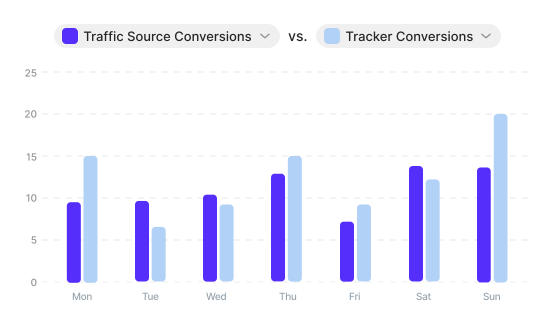
Ask AI to compare traffic source and Voluum data, uncover conversion discrepancies, and avoid optimizing on unreliable numbers.
Bar chart comparing traffic source conversions with ClickFlare tracker conversions by day

Track Real Cost per Action

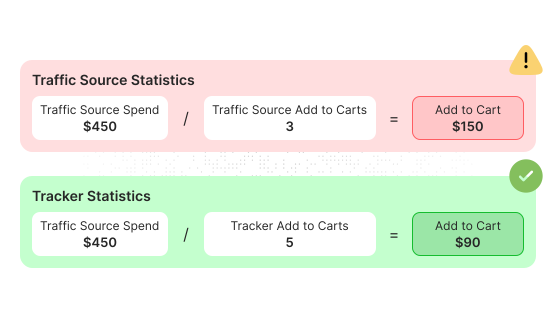
Use blended tracker and traffic source data to analyze accurate cost per action. Get rid of inflated numbers that lead to bad optimization.
Cost per action formula comparing traffic source statistics with ClickFlare tracker statistics

Optimize Using Funnel Metrics

Use funnel metrics to asses performance and cut spend waste. No need to spend 2x-3x your CPA before killing underperforming assets.
Funnel path from ad to landing page to offer used to spot performance issues before final conversions

Optimize for Specific Events

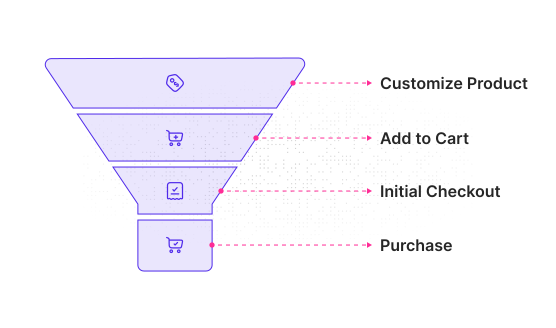
Use early funnel events and custom metrics to help AI identify winners and underperformers before final conversions arrive.
Conversion funnel showing custom product, add to cart, initial checkout, and purchase events

Track the Impact of Funnel Changes

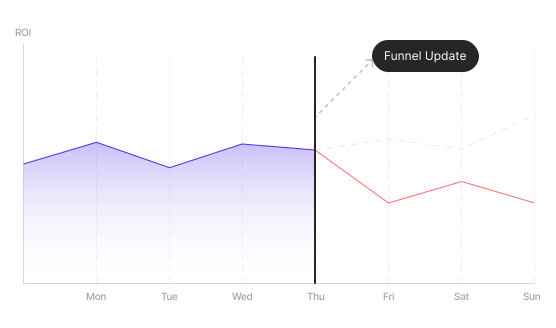
Know exactly how your funnel tweaks impact performance. Get alerts, pause, scale, or shift budgets based on what the data tells you.
Line chart showing campaign performance before and after a funnel update

Detect Click-Loss Problems

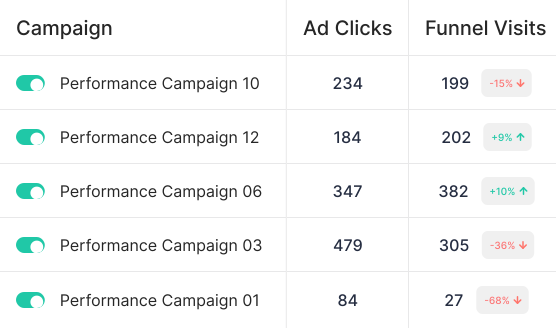
Monitor ad click-to-visit consistency and stop wasting budget when page load issues, redirects, or broken flows are killing conversions.
Campaign table comparing ad clicks with ClickFlare funnel visits to uncover click-loss

Optimize With Precision as You Scale

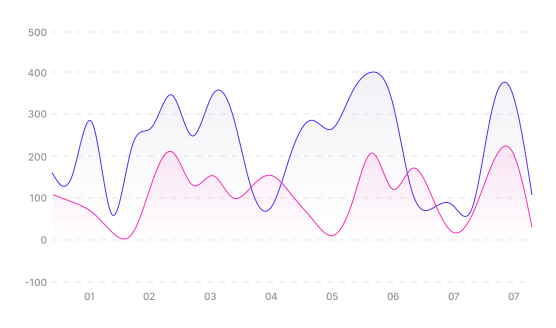
Keep attribution sharp and reporting consistent. even when multiplying campaigns or expanding across multiple ad accounts.
Two trend lines showing campaign performance while scaling with consistent tracker data

Create Custom KPIs to Fit Your Goals

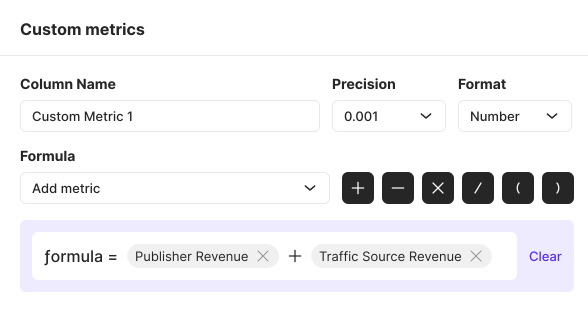
Build your own performance metrics using simple formulas that combine traffic source and third-party data. Think true CPA or blended ROAS.
Custom metric builder combining ClickFlare and traffic source data into a new KPI

Accurate Stats on All Campaign Levels

Get accurate attributed revenue and conversions across all campaign levels, giving you a clear and reliable view of performance.
Voluum data flowing into TheOptimizer for campaign-level reporting

Scale Across Multiple Channels

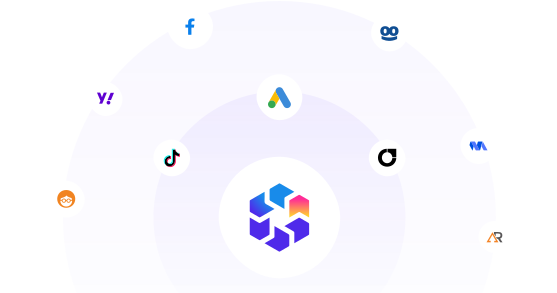
Expand across multiple ad networks. Launch, optimize and scale campaigns across multiple channels from one dashboard.
TheOptimizer connected to multiple ad networks with ClickFlare tracker data in the center
automate 90% of my work
Within one month of using The Optimizer, I have been able to automate about 90% of my campaign management tasks. I haven't checked my campaigns that much in the past 10 days, and everything has been going great.
Ara Davtian from Ten Digital, TheOptimizer customer
Ara Davtian
Ten Digital
Get Started for Free
TheOptimizer campaign management dashboard interface

Analyze, Optimize, and Scale from One Dashboard

Connect your ad platforms, analytics tools, and CRM data in one place. Use AI to uncover opportunities, execute optimizations, and automate repetitive work across multiple accounts.
Ask AI to uncover opportunities, execute optimizations, and automate repetitive tasks across all your accounts.
Combine ad network, tracker, and CRM data into custom metrics to power smarter decisions and automations.
Analyze performance across different time periods to detect trends, anomalies, and emerging opportunities.
Report across hundreds of accounts, clients, and currencies from one place.
Get Started for Free
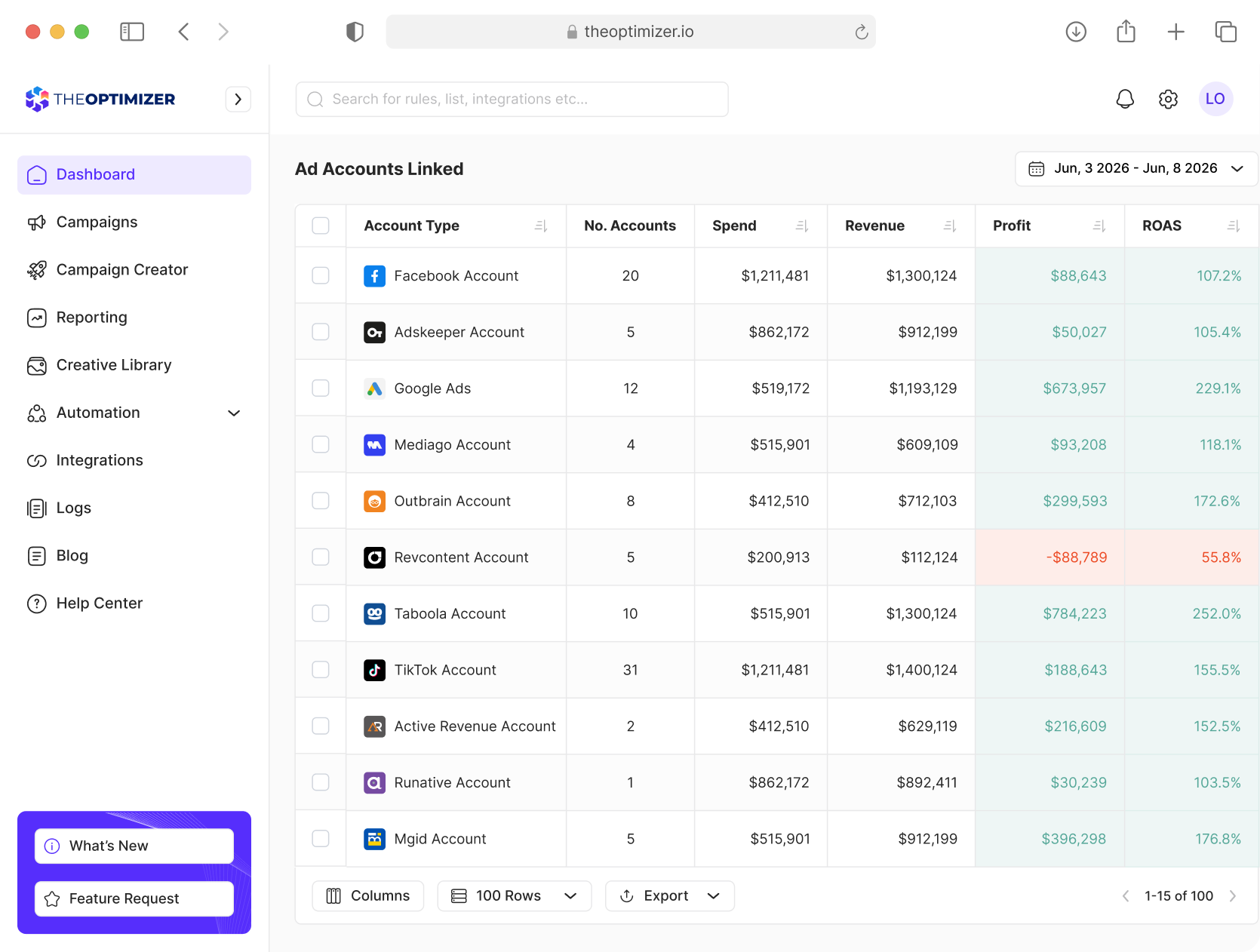
TheOptimizer dashboard showing ad accounts unified across multiple networks with spend, revenue, and profit columns for each connected account

Frequently Asked Questions

Have more questions? Send us a message and we will be happy to help.
Contact Us
Why should I connect Voluum to TheOptimizer?

Connecting Voluum gives you access to deeper funnel insights than ad network data alone. Compare tracker and traffic source performance, identify reporting discrepancies, optimize using custom conversion events, and automate decisions based on the metrics that matter most to your business.

Can I connect Voluum without connecting an ad network account?

No. TheOptimizer relies on ad network data to analyze performance and execute optimization actions. Before connecting Voluum, you must connect at least one supported ad network account.

How is Voluum data reported in TheOptimizer?

TheOptimizer automatically matches Voluum data with your ad network data using identifiers such as campaign IDs, ad set or ad group IDs, ad IDs, publisher IDs, and more. This allows you to compare tracker and traffic source data side by side, identify discrepancies, and make better optimization decisions.

How often is Voluum data synced?

The sync frequency depends on your subscription plan. Standard synchronisation frequency is every 20 minutes on all plans except Master plan. Master plan synchronisation frequency is every 10 minutes. This ensures your reports, automations, and optimization decisions are based on up-to-date data.

Can I sync CRM data in addition to Voluum?

Yes. If you track additional customer or revenue data in your CRM, you can import it into TheOptimizer using our Google Sheets integration or Custom API integration. This data can then be used for reporting, AI analysis, custom metrics, and automation.

I track multiple conversion events in Voluum. Does TheOptimizer report them?

Yes. TheOptimizer imports your custom conversion events and reports them alongside key funnel metrics such as landing page CTR, offer conversion rate, conversion rate, revenue, and other performance indicators. These metrics can also be used in reports, AI analysis, custom metrics, and automation rules.

Can I try TheOptimizer for free?

Yes. TheOptimizer offers a 7 day free trial with no credit card required. Connect your ad networks and experience AI powered optimization and automation firsthand.
