Google Ads Just Changed How Daily Budgets Work. Here's What It Means for Your Spend.

If you run Google Ads on a schedule (weekdays only, business hours only, weekends only, specific dayparts), your monthly spend is about to go up. Potentially by a lot.
Google announced a change to budget pacing that takes effect June 1, 2026. The announcement frames it as "making it easier for advertisers to hit monthly spending goals." The practical effect for anyone using ad scheduling? You'll spend more money with the same daily budget setting.
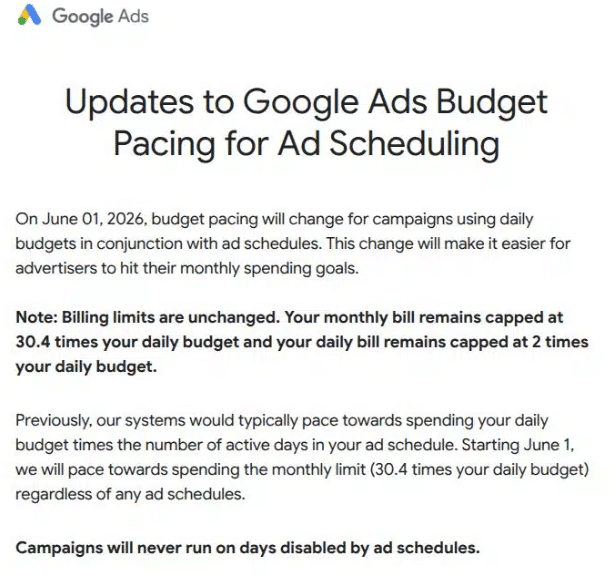
Here's the change in plain language:
Before June 1: Google paced your spend based on the number of days your ads actually ran. If your campaign was set to weekdays only, Google aimed to spend your daily budget across those ~22 weekdays per month. Your daily budget worked roughly like a daily cap.
After June 1: Google paces toward the full monthly limit (30.4x your daily budget) regardless of how many days your schedule allows. Your ads still only run during your scheduled windows. But Google will push harder to spend the full monthly cap within those windows.
Your daily budget is no longer acting as a daily cap. It's a monthly target being compressed into fewer days.
Ginny Marvin, Google Ads Liaison, confirmed on X that spend will still be driven by campaign objectives and no campaign will exceed existing billing caps. But as Search Engine Land put it: "Budget pacing is becoming less about when ads run and more about ensuring the full budget gets spent."
That last part is what should get your attention.
The Math That Matters
Let me break this down with actual numbers because the impact isn't obvious until you run the math.
Google's billing rules haven't changed:
- Daily cap: Your bill on any single day can't exceed 2x your daily budget
- Monthly cap: Your monthly bill can't exceed 30.4x your daily budget
- Schedule respected: Your ads still won't run on days or hours you've disabled
What changed is how aggressively Google uses the room between your daily budget and those caps.
The formula that matters now:
Effective daily spend = (Daily budget × 30.4) ÷ Number of active days per month
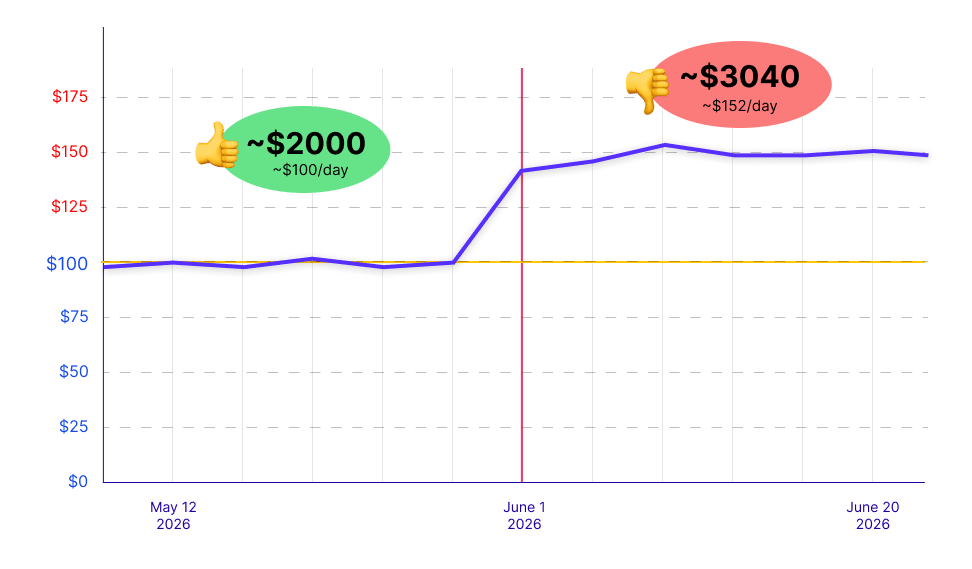
So if your daily budget is $100 and you run ads 20 days per month:
($100 × 30.4) ÷ 20 = $152/day
That's 52% more per active day than what you were spending before. Same daily budget setting. Same schedule. More money going out the door.
Three Real Scenarios to Show the Impact
Let me walk through three common scheduling setups so you can see exactly what this looks like for different types of advertisers.
Scenario 1: Weekdays Only (Mon-Fri)
A pretty common setup. A B2B company or local service business that only wants to run ads during the work week.
Google will try to push the full $3,040 monthly cap through 22 days instead of 30.4. Each active day absorbs more spend.
Scenario 2: Weekends Only (Sat-Sun)
A restaurant, entertainment venue, or e-commerce brand that concentrates spend on weekends.
This is the most dramatic case. With only 8 active days, Google has to push $3,040 through a very narrow window. The 2x daily cap limits each day to $200, so the actual monthly total would be around $1,600 (8 days × $200). That's still double what you were spending before.
Scenario 3: Business Hours Only (Mon-Fri, 9 AM - 5 PM)
A service business that wants leads only when the phone is staffed.
Same percentage increase as Scenario 1 because the number of active days is the same. The hourly restriction doesn't change the math since Google was already pacing within those hours. What changes is how aggressively it spends during those hours.
Key takeaway:
The fewer days your schedule allows, the bigger the impact. A 5-day schedule sees a ~38% increase per active day. A 2-day schedule sees up to 100%. A 7-day schedule (every day) sees no change at all because the current pacing and the new pacing are identical when all days are active.
Who Gets Hit Hardest
Not every advertiser is affected equally. Here's who needs to pay attention:
Local service businesses that run ads only during staffed hours. Plumbers, lawyers, dentists, HVAC companies. These businesses use scheduling specifically to control when leads come in. More spend during the same hours means more leads arriving when staff capacity hasn't changed.
B2B companies running weekday-only campaigns. If your sales team doesn't work weekends, you probably don't want ads on weekends. But now your weekday spend increases to compensate for those inactive weekend days.
Agencies managing client budgets. If a client said "I want to spend $3,000/month" and you set a daily budget based on active days, that math just broke. The same daily budget now targets a higher monthly total.
Advertisers using scheduling as a spending control. This is the big one. Many small-business advertisers treated ad scheduling as more than a timing control. In practice, it worked like a soft spending control too. That soft control just got removed.
Who's NOT affected:
- Campaigns running every day with no schedule restrictions (no change)
- Local Services Ads (confirmed not affected)
- Campaigns using campaign total budgets instead of daily budgets (different pacing system entirely)
What Stays the Same
Google was careful to emphasize that billing limits haven't changed. Let me be clear about what's not moving:
- Your monthly bill is still capped at 30.4x your daily budget
- Your daily bill is still capped at 2x your daily budget on any single day
- Your ads will not run on days or hours you've disabled in your schedule
- Your bid strategy, targeting, and campaign objectives are unchanged
The change is entirely about how aggressively Google spends within the room you already gave it. No new limits were added. No existing limits were raised. The pacing behavior inside the existing limits is what changed.
Think of it like this: you set a speed limit of 100 mph on a highway. Before, the car was driving 60 mph. The speed limit didn't change. The car just started driving faster.
What to Do Before June 1, 2026
You have a few weeks to prepare. Here's the step-by-step:
Step 1: Identify affected campaigns
Open your Google Ads account. Filter for campaigns that use ad scheduling. Any campaign with a schedule that doesn't cover all 7 days is affected.
Step 2: Calculate your new effective daily spend
For each affected campaign:
New effective daily = (Current daily budget × 30.4) ÷ Active days per month
Compare this against what you were spending. If the increase is more than you're comfortable with, you need to adjust.
Step 3: Lower daily budgets to maintain your current monthly spend
If your real goal is "I want to spend $2,200/month" and your campaign runs 22 days:
New daily budget = $2,200 ÷ 30.4 = ~$72
Set your daily budget to $72 instead of $100. Google will pace toward $72 × 30.4 = $2,189/month, which is close to your original $2,200 target even with the new pacing logic.
A quick reference table:
Step 4: Consider switching to campaign total budgets
If your real objective is a fixed monthly spend amount, campaign total budgets might be a cleaner option under the new pacing rules. With total budgets, you set the exact amount you want to spend over a defined period, and Google paces to hit that exact number. No daily budget multiplication math.
The trade-off: total budgets don't have the 2x daily cap, so Google can spend more aggressively on high-opportunity days. But you get precise control over the total amount.
Step 5: Monitor closely for the first 2 weeks after June 1
Even after adjusting budgets, watch your campaigns daily for the first 2 weeks. Check:
- Daily spend vs. expected spend
- Hourly distribution of spend (is it front-loading?)
- Conversion volume and CPA (more spend doesn't always mean proportionally more conversions)
- Impression share during active windows
How to Automatically Protect Budgets on Google Ads
Here's where manual monitoring breaks down. You recalculated your budgets. You made the adjustments. But what happens on June 15 when you're busy with something else and one of your campaigns starts spending 40% more than expected because you missed a schedule edge case?
This is the kind of problem that automation solves cleanly.
TheOptimizer connects to Google Ads via API and lets you build automation rules that monitor spend, adjust budgets, and protect your campaigns 24/7. Here's what a post-June-1 protection setup looks like:
Rule 1: Daily spend alert
IF Campaign daily spend > $X (your adjusted threshold)
THEN Send alert (email, Slack, or Telegram)
Run every 30 minutes
This catches any campaign that's spending faster than expected under the new pacing logic.
Rule 2: Budget cap enforcement
IF Campaign spend yesterda > (110% of Daily target)
THEN Decrease daily budget by 15%
Run daily (at mindnight ad account time zone)
This prevents weekly overspend by automatically pulling back the budget when spend trends above your target.
Rule 3: CPA protection
IF Campaign CPA over the last 3 days > Target CPA by 25%
AND Campaign spend > $X
THEN Pause campaign AND Send alert
Run every hour
More aggressive spend doesn't always translate to more conversions. If the extra spend is going to lower-quality impressions, your CPA will rise. This rule catches it.
Rule 4: Keyword-level cost control
IF Keyword spend > $X AND Conversions = 0
THEN Pause keyword
Run every 10 minutes
With Google pushing harder to spend your budget, low-performing keywords will consume more money faster. This rule eliminates waste at the keyword level before it accumulates.
TheOptimizer already supports Google Ads automation with the ability to pause campaigns, ad groups, and ads, adjust bids and budgets, disable expensive keywords, exclude search terms, and clone high-performing ad groups. All based on custom conditions running as frequently as every 10 minutes.
One of our users put it well: "Their support team helped us implement real-time S2S conversion tracking for Google Ads at the keyword level with automated rules, a game-changer other tools couldn't match."
If you're also running Meta Ads, native ads (Taboola, Outbrain, MGID), or TikTok alongside Google, TheOptimizer manages all of them from the same dashboard with the same automation engine. One rule set. One login. Every traffic source covered.
FAQ
When does this change take effect?
June 1, 2026. Google initially announced it for March 1 but pushed the date to June 1 for a broader rollout. Some accounts may have been affected earlier during the gradual rollout phase. If you received an email notification from Google, your account is included.
Will my ads run outside my scheduled hours or days?
No. Google confirmed that campaigns will never run on days disabled by ad schedules. The change only affects how aggressively Google spends during your scheduled windows.
Can Google actually charge me more than my daily budget in a single day?
Yes, up to 2x your daily budget. This isn't new. Google has always been able to overspend on individual days (up to 2x) as long as the monthly total stays within 30.4x. What's new is that this 2x daily overspend will happen more frequently for scheduled campaigns because Google is trying harder to hit the full monthly cap.
Should I just remove my ad schedule to avoid this?
Only if you actually want your ads running 24/7. If you have a business reason for scheduling (staffing, lead quality at certain hours, B2B targeting on weekdays), keep the schedule. Just lower your daily budget to match your real monthly target using the formula: Monthly target ÷ 30.4 = New daily budget.
Does this affect Performance Max campaigns?
Google hasn't explicitly excluded PMax from this change. If your PMax campaign uses ad scheduling (which not all PMax setups do), it's likely affected. Monitor your PMax campaigns closely after June 1.
Are Local Services Ads affected?
No. Google confirmed that LSAs are not affected by this pacing change.
What if I use campaign total budgets instead of daily budgets?
Campaign total budgets use a completely different pacing system. You set a total amount for a defined period, and Google paces to hit that exact total. The June 1 change only affects campaigns using average daily budgets with ad scheduling.
I didn't get an email from Google. Am I affected?
Google is rolling this out gradually. Ginny Marvin clarified that only advertisers who received notifications will be affected initially. But the change is expanding to all accounts, so prepare regardless.
What's the bottom line? Is Google just trying to get me to spend more?
The cynical read is yes. Google framed it as "aligning budget pacing with monthly spending goals," but the practical effect for scheduled campaigns is higher monthly spend with the same daily budget setting. Whether that additional spend converts profitably depends on your campaigns. More spend in the same windows means more impression volume, but not necessarily proportionally more conversions. Monitor CPA and ROAS carefully after the change.