Every Meta Ad Size You Need in 2026: Dimensions, Formats, and Placements (Complete Guide)

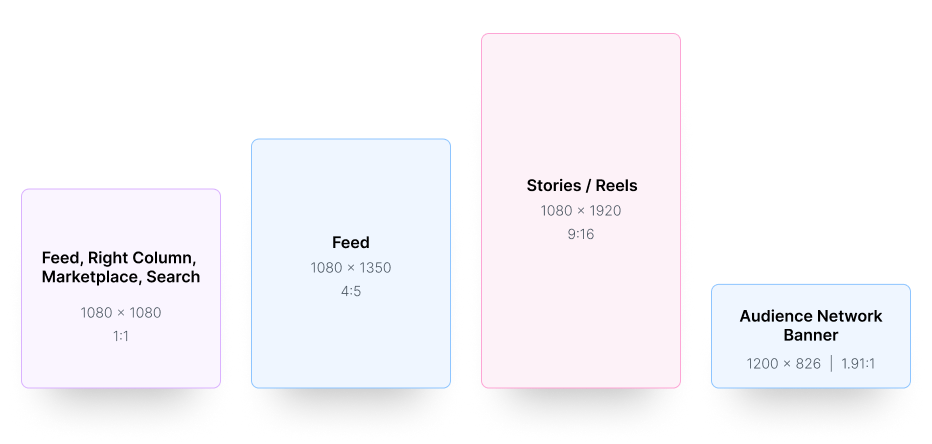
Let me save you 20 minutes of scrolling through spec sheets. Meta has 25+ placements, but three aspect ratios cover roughly 90% of all ad delivery:
4:5 vertical (1080 x 1350 px) for Feed placements. This is what Meta recommends as the default Feed format. It takes up 25% more screen space than square on mobile. More screen space means more attention. More attention means better CTR.
9:16 vertical (1080 x 1920 px) for Stories, Reels, and all full-screen placements. This is the only ratio that fills a phone screen completely. With Instagram Explore feed being retired in January 2026 and that traffic flowing into Reels, 9:16 has become even more important.
1:1 square (1080 x 1080 px) as the universal fallback. Works across 80%+ of placements. Required for carousel cards. Still the safest option when you can only produce one size.
If you build creatives at these three sizes, you'll cover Feed, Stories, Reels, Threads, Messenger, Marketplace, and most of Audience Network. Everything else is a niche case.
Every Meta Ads Placement in 2026
Here's the full list of placements available across Meta's ecosystem, organized by platform. Some of these are familiar. A few are new.
Facebook:
- Facebook Feed
- Facebook Marketplace
- Facebook Video Feeds
- Facebook Right Column (desktop only)
- Facebook Stories
- Facebook Reels
- Facebook In-Stream Video
- Facebook Search Results
Instagram:
- Instagram Feed
- Instagram Stories
- Instagram Reels
- Instagram Explore Home (grid tiles only; the scrollable Explore feed was removed in January 2026)
- Instagram Profile Feed
Threads:
- Threads Feed (rolled out globally in January 2026; supports image, video, and carousel ads)
Messenger:
- Messenger Inbox
- Messenger Stories
- Sponsored Messages
Audience Network:
- Native ads
- Banner ads
- Interstitial ads
That's 20+ distinct surfaces. Each one has slightly different dimension preferences, safe zones, and format support. The good news is that the three ratios from above cover the vast majority of them. The table below gives you the exact specs.
Complete Meta Ads Dimensions Breakdown by Placement
Here's every placement with its recommended dimensions, aspect ratio, and supported formats. Bookmark this.
Key notes:
- Carousel cards always use 1:1 (1080 x 1080) regardless of placement. Using 4:5 for carousel cards can cause unpredictable cropping.
- Threads supports both 1:1 and 4:5. Images taller than 4:5 get center-cropped to 4:5, so don't upload 9:16 for Threads Feed.
- Reels placements are video only. No static images.
- Right Column is desktop only and renders small on screen. Keep text large and visuals simple.
- In-Stream is the one placement where 16:9 horizontal still makes sense since users are watching longer video content.
Supported Ad Types by Placement
Not every placement supports every format. Here's a clearer breakdown:
Single Image Ads work on: Feed (FB + IG), Threads, Stories, Marketplace, Right Column, Search, Explore Home, Messenger, Audience Network. Basically everywhere except Reels and In-Stream.
Single Video Ads work on: Feed (FB + IG), Threads, Stories, Reels, In-Stream, Video Feeds, Marketplace, Search, Explore Home, Messenger, Audience Network. The most broadly supported format.
Carousel Ads work on: Feed (FB + IG), Threads, Stories (9:16 cards), Marketplace, Search, Messenger. Not available on Reels, In-Stream, Right Column, or Explore Home.
Collection Ads work on: Feed (FB + IG), Stories, Reels, Marketplace, Search. Note: as of March 2026, Collection format was removed from Ad Setup and is now accessible through Ad Creative within Format Display settings.
The production priority for most advertisers:If you can only produce one format, make it a short vertical video (9:16, under 30 seconds). It runs on the most placements with the highest engagement rates. Add a 4:5 version for Feed and a 1:1 crop for carousels and fallback placements.
The 2026 recommendation is to create vertical 9:16 as your primary format and adapt to other aspect ratios as needed.
Meta Ads Safe Zones: Where Your Content Gets Hidden
This is the part that trips people up the most. You design a beautiful 9:16 Stories ad, upload it, and your headline is hidden behind Meta's profile icon at the top and your CTA is buried under the swipe-up button at the bottom.
Safe zones are the areas on screen where Meta's UI elements (profile pictures, usernames, buttons, captions, engagement icons) sit on top of your creative. You need to keep important content out of those areas.
Stories and Reels (unified since March 2026):As of March 2026, Meta consolidated Facebook Stories, Facebook Reels, Instagram Stories, and Instagram Reels into a single safe zone:
- Top 14% (~250 px on 1080 x 1920): Profile icon, username, "Sponsored" label
- Bottom 20 to 35% (~340 to 670 px on 1080 x 1920): CTA buttons, engagement icons, caption
- Sides 6% (~65 px on each side): Device edge variance
Practical rule: Keep your headline, logo, and any text you care about in the center 1080 x 1420 area of your 1080 x 1920 canvas. Surfside PPC's analysis recommends exactly this safe area for Stories creatives.
Feed placements:Feed is more forgiving. The main risk is text truncation in the copy fields (primary text cuts off after 125 characters on mobile), but the visual creative itself doesn't get overlaid with UI elements.
Threads:Threads crops images taller than 4:5 with a center crop. Design for 4:5 as your maximum vertical ratio for Threads, even if you're designing 9:16 for Stories. Use Meta's Placement Asset Customization to assign different ratios per placement.
Pro Tip:
Toggle on the Safe Zone Guardrail in Ads Manager during ad setup. It overlays safe and unsafe regions directly on your creative preview. Cycle through each placement to check. Takes under 2 minutes per ad.
Meta Video Ad Specs (The Technical Stuff)
For video ads across all placements, here's what Meta requires:
The practical advice: Export at 1080p, H.264, under 1 GB, with burned-in captions. Don't over-compress. Meta's compression will handle the rest. Pre-compressing before upload often causes double-compression artifacts that make your video look worse, not better.
What Changed in Meta Ads in 2026
A few things shifted this year that affect how you think about creative production:
Instagram Explore Feed removed (January 2026). The scrollable Explore feed is gone. Ads that ran there now deliver through Reels. Explore Home (the grid-tile layout when you tap the Explore tab) still exists and uses 1:1. This means more delivery flowing into 9:16 Reels inventory.
Stories and Reels safe zones unified (March 2026). You no longer need separate safe zone specs for Stories vs Reels. One template covers both.
Threads ads rolled out globally (January 2026). Threads now supports image, video, and carousel ads. Specs are similar to Instagram Feed: 1:1 or 4:5 recommended. CPMs on Threads tend to be lower than Feed or Stories since the placement is still early.
Flexible Format removed from Ad Setup (March 2026). The single toggle that handled format automation was removed. Its features are now distributed across Format Display Options, Flexible Media, Placement Asset Customization, and Advantage+ Creative.
Collection format moved (March 2026). Collection is no longer visible in Ad Setup. It's now accessible through Ad Creative within Format Display settings.
Reels post-loop ads removed (November 2025). The overlay format remains, but the post-loop placement is gone.
Meta now recommends 1440 resolution. They now recommends 1440 x 1440 for square and 1440 x 1800 for vertical to look sharp on high-density screens. 1080 still works, but 1440 looks better on newer devices.
Testing Meta Ad Sizes Across Placements
The advice from Meta is to use Advantage+ Placements and let the algorithm pick where your ads run. That works for a lot of advertisers. But if you want to test whether certain sizes perform better on certain placements, you need a structured approach.
Option 1: Placement Asset Customization (PAC)Meta lets you assign different creative assets to different placements within a single ad. Upload your 4:5 version for Feed, your 9:16 version for Stories and Reels, and your 1:1 version for Marketplace and Right Column. The algorithm delivers the right asset to the right placement.
This is the simplest way to test because you're not fragmenting your campaign. One ad, multiple assets, one learning phase.
Option 2: Separate ad sets per placement groupFor more granular data, create separate ad sets targeting different placement groups (Feed only, Stories/Reels only, etc.). Compare CPA, conversion quality, and engagement across each. This gives you cleaner data but fragments the learning phase, so you need enough budget per ad set (at least $50/day) to make it work.
Option 3: Launch in bulk and let automation handle itThis is the approach I use for large-scale testing. Upload all your creative variants (4:5, 9:16, 1:1) into TheOptimizer's Creative Library, tag them by format, and deploy them across campaigns using saved templates.
In our case study on launching 89 campaigns in under 60 minutes, I used this exact workflow to test hundreds of creative-placement combinations simultaneously. The Campaign Launcher handles the deployment. The automation rules handle everything after: pausing placements that waste money, scaling placements that convert, and detecting creative fatigue before it kills performance.
TheOptimizer also lets you build rules that block specific placements based on performance data. If Audience Network isn't converting at your target CPA, the rule blocks it automatically without you needing to manually check breakdown reports.For more on how TheOptimizer handles placement optimization automatically, see our guide on Meta Ads placement control in 2026.
FAQ
What's the best image size for Facebook ads in 2026?
1080 x 1350 pixels (4:5 vertical) for Feed placements. It takes up more mobile screen space than square and typically delivers higher CTR. For universal compatibility across all placements, 1080 x 1080 (1:1 square) works everywhere.
What size are Instagram Reels ads?
1080 x 1920 pixels (9:16 vertical). Reels only supports video, not static images. Keep important content within the center safe zone to avoid UI overlays covering your text or logo.
What size are Instagram Story ads?
1080 x 1920 pixels (9:16 vertical). Supports both image and video. Keep logos and text within the center 1080 x 1420 area to stay inside the safe zone.
What dimensions do Threads ads use?
1080 x 1080 (1:1) or 1080 x 1350 (4:5). Images taller than 4:5 get center-cropped on Threads. Use Placement Asset Customization to assign a 4:5 or 1:1 version specifically for Threads.
What's the maximum file size for Meta video ads?
4 GB, but aim for under 1 GB. Smaller files upload faster and process more reliably. Use H.264 codec in MP4 format at 30 fps or lower.
Do I need different creatives for every placement?
Not necessarily. Three versions (4:5 for Feed, 9:16 for Stories/Reels, 1:1 for carousels and fallback) cover roughly 90% of delivery. Use Placement Asset Customization to assign each version to its correct placements within a single ad.
Are "Facebook ad sizes" and "Meta ad sizes" the same thing?
Yes. Meta is the parent company of Facebook and Instagram. The ad platform is the same. All specs, formats, and requirements are identical whether you call them "Facebook ad sizes" or "Meta ad sizes."
Does Meta still have a text-on-image rule?
The strict 20% text rule was officially removed, but Meta's algorithm still favors creatives with minimal text overlay. Ads with heavy text overlays tend to see higher CPMs and lower delivery. Use the primary text field for copy and keep the visual clean.
What carousel card size should I use?
1080 x 1080 (1:1 square). Always. Even though some placements technically accept 4:5 carousel cards, Meta will crop them to 1:1 in many contexts, causing unpredictable results. Stick with square for carousel cards.