Meta Ads MCP vs. Automation Tools: What Media Buyers Actually Need in 2026

On April 29, 2026, Meta launched its official Ads AI Connectors, built on what's called the Model Context Protocol (MCP). For the first time, you can connect your Meta ad account directly to AI tools like Claude, ChatGPT, Cursor, and others and manage campaigns through plain-language conversations.
MCP is a standardized communication layer that lets AI tools talk to external services through a consistent interface. Anthropic originally launched the protocol in November 2024, and it's since spread across the ad tech ecosystem. Google, Amazon, LinkedIn, and now Meta have all built MCP servers for their advertising platforms.In practice, it means you can open Claude or ChatGPT, connect your Meta ad account, and type something like:
- "Show me my top 10 ads by ROAS from the last 14 days"
- "Pause every ad set with frequency above 4"
- "Create a draft campaign targeting US women 25 to 44"
The AI reads your live ad account data and can execute changes directly. No Ads Manager. No clicking through menus. Just conversation.
Meta's official MCP server is hosted at mcp.facebook.com/ads. Setup takes about 5 to 15 minutes. You authenticate through standard Meta Business OAuth (the same login used for Shopify and Mailchimp integrations), paste the URL into your AI tool's MCP settings, and you're connected. No API keys, no developer credentials, no coding required.
The MCP server is currently free during the open beta. Meta hasn't communicated post-beta pricing or an end date. Usage-based pricing is to be expected.It sounds great on paper. And for certain use cases, it genuinely is. But "I can talk to my ad account" is very different from "I can manage my ad account at scale." That distinction is what this article is about.
What Can You Do With Meta Ads MCP? (The 29 Tools)
The official MCP exposes 29 tools organized across five categories:
Insights (7 tools): Pull performance data by date range, compare metrics across campaigns, get breakdowns by placement, audience, or device. This is the strongest category. You can ask complex reporting questions and get answers in seconds.
Campaign Management (5 tools): Create, edit, pause, and activate campaigns, ad sets, and ads. This includes budget changes and targeting edits on live campaigns.
Product Catalog (10 tools): Manage product feeds, audit catalog items, flag broken images or missing GTINs. Useful for e-commerce advertisers managing large catalogs.
Diagnostics (4 tools): Check signal quality, audit event tracking, diagnose delivery issues. Helpful for troubleshooting underperforming campaigns.
Assets (3 tools): Manage creative assets, audiences, and account-level settings.
That's a pretty solid feature set for conversational use. You can pull reports, make changes, and diagnose problems without opening Ads Manager.
But there's a big difference between being able to do something when you ask, and having something done automatically, consistently, every 10 minutes, 24 hours a day, across 50 campaigns and 10 ad accounts. That's where the comparison with SaaS tools begins.
Managing Campaigns: Ads Manager vs. MCP Through AI vs. TheOptimizer
Let me walk through a practical scenario: managing 100 campaigns across 5 ad accounts. Daily tasks include checking performance, pausing underperformers, scaling winners, detecting creative fatigue, and adjusting budgets.
Meta Ads Manager (Manual)
You log into each ad account. Navigate to each campaign. Check metrics. Sort by CPA. Identify underperformers. Pause them one by one. Find winners. Calculate budget increases. Apply them. Switch to the next account. Repeat.
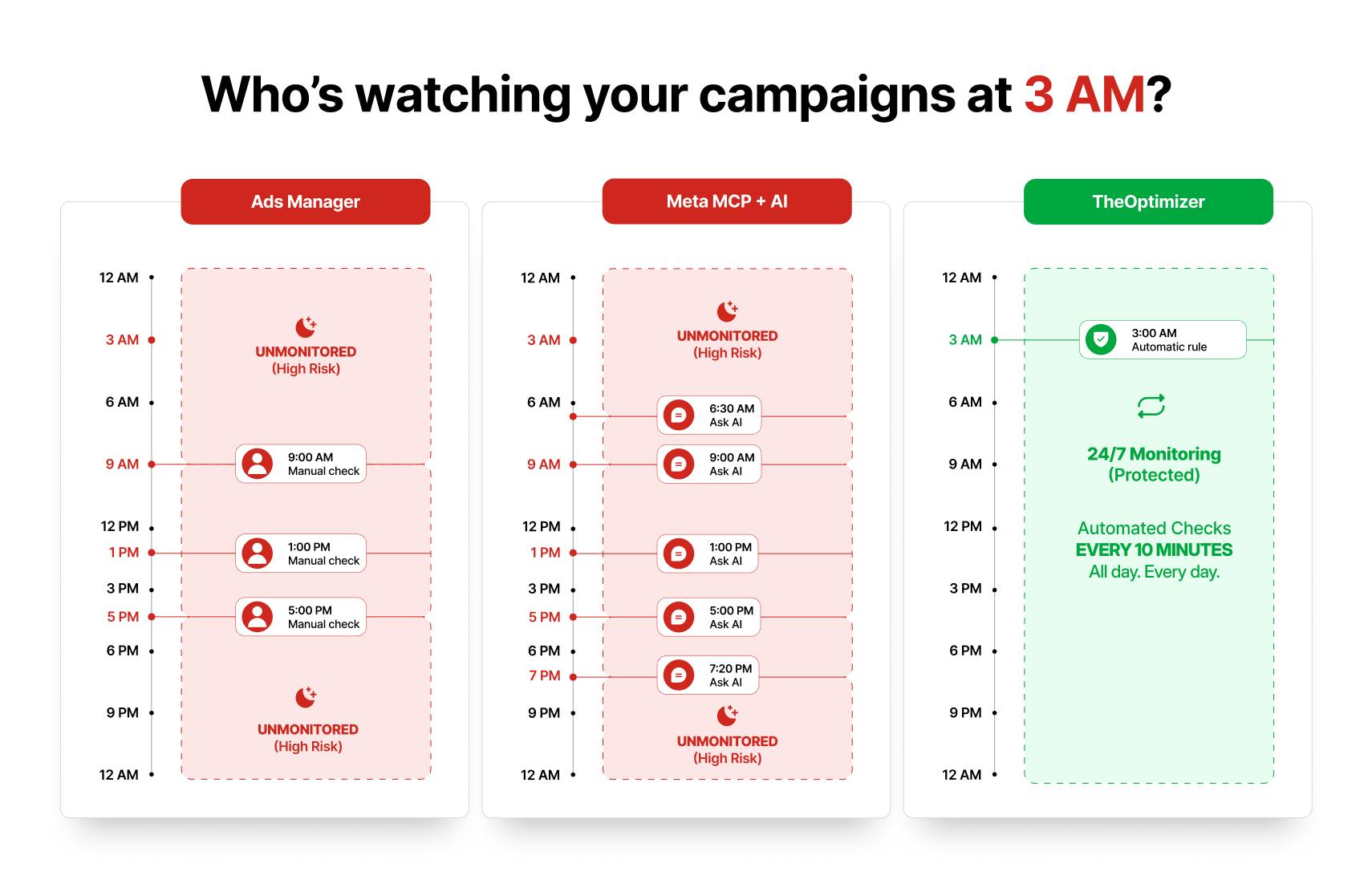
For 100 campaigns across 5 accounts, this takes 2 to 4 hours daily. And that's if you're fast and don't get interrupted. On weekends and evenings, nobody's checking. Campaigns that start bleeding at 11 PM on a Friday keep bleeding until Monday morning.
Meta Ads MCP Through Claude or ChatGPT
You open Claude. Type: "Show me all ad sets with CPA above $50 in the last 3 days across all connected accounts." Claude pulls the data. You review it. Type: "Pause ad sets 123, 456, 789." Done.
But here's the catch: you still have to be there. You have to initiate the conversation. You have to review the data. You have to type the command. You have to confirm the action. Every single time.
At 3 AM when your CPA spikes? Nobody's asking Claude. On Saturday afternoon? You're at your kid's soccer game, not prompting ChatGPT. The AI is fast, but it's not autonomous. It only works when you work.
TheOptimizer (Automated SaaS)
You set up your rules once
- IF ad set CPA > $50 for 3 days AND Conversions = 0, THEN Pause. Run every 10 minutes.
- IF campaign ROI > 20% for 3+ days AND conversions > 10, THEN Increase budget by 20%. Run twice per week at the start of the day.
- IF ad CTR dropped 30% vs 14-day baseline AND Frequency > 3, THEN Pause ad AND Send alert. Run every 15 minutes
- IF ad set ROI stable across two time windows, THEN Clone to another ad account. Run once per week.
These rules run 24/7. They don't need you to type anything. They don't need you to be awake. They execute automatically, across all 100 campaigns, across all 5 ad accounts, every 10 minutes.
For the exact rules I use, check our guide on 8 automation rules for scaling Meta Ads safely.
Where Meta Ads MCP Through AI Falls Short
MCP is a great reporting and command interface. But it has real limitations that matter for anyone managing campaigns at volume.
No autonomous execution. MCP is conversational. It responds when you ask. It doesn't monitor your campaigns in the background or take action when you're not there. As AdAmigo's analysis noted: "MCP lacks safeguards for preventing errors like overspending or disrupting Meta's auction algorithm."
No conditional logic or multi-time-interval rules. You can't tell MCP: "IF CPA over the last 3 days is 50% higher than CPA over the last 7 to 3 days, AND ROI yesterday was below -10%, THEN pause." That kind of multi-condition, multi-timeframe logic is what separates simple commands from real optimization. MCP handles one-shot commands, not persistent rule engines.
No third-party tracker integration. MCP reads Meta's data. It can't pull revenue from Voluum, RedTrack, Binom, or ClickFlare. For affiliate marketers, lead gen buyers, and anyone whose real ROI data lives outside Meta, this is a dealbreaker.
No cross-account cloning. MCP can create campaigns within an account it's connected to. It can't clone a winning campaign from Account A to Account B with adjusted settings. Cross-account horizontal scaling requires API-level operations that MCP doesn't support.
No campaign templates. Every time you ask the AI to create a campaign, you describe the settings from scratch. There's no saved template system. No "use my standard testing structure with ABO, $30 per ad set, broad targeting, and these placements."
Token consumption eats into your AI subscription. Community benchmarks show that loading the 29 MCP tool definitions consumes roughly 55,000 to 134,000 tokens before the AI writes a single word. On Claude Pro at $20/month, that context overhead limits how many complex interactions you can have per session before hitting your usage cap.
No confirmation safety layer. Be careful: "This gives your AI full write access to your live ad account. Budget changes, targeting edits, campaign creation. No undo, no draft mode, no confirmation screen." An ambiguous prompt or an AI hallucination can make real, irreversible changes to your campaigns.
What SaaS Tools Like TheOptimizer Do That Meta Ads Manager and MCP Don't
Here's the gap that neither Ads Manager nor MCP fills:
Persistent, autonomous rule execution. TheOptimizer rules run every 10 minutes without human input. They monitor every campaign, every ad set, every ad across all connected accounts. This isn't "ask and receive." This is "set and forget with full accountability."
Multi-condition, multi-timeframe logic. Compare CPA over the last 2 days against CPA from days 7 to 3. Check ROI over two different windows before scaling. Evaluate trends over time, not just snapshots. This conditional depth is what separates a media buyer's optimization brain from a simple command interface.
Third-party tracker integration. Connect ClickFlare, Voluum, RedTrack, Binom, FunnelFlux or GA4 and build rules based on confirmed revenue. Not Meta's modeled attribution. Actual money in your account.I covered why this matters in our article on optimizing Meta Ads using tracker data.
Campaign templates and bulk launching. Save your campaign structure as a template (objective, bid strategy, budget, placements, pixel, optimization event). Upload creatives to a visual library with tags. Deploy 50 to 100+ campaigns in minutes from the template. No describing settings to an AI each time.See how I launched 89 campaigns with 630 ads in under 60 minutes using this workflow.
Cross-account and cross-network management. Clone winning campaigns across ad accounts. Run the same automation rules across Meta, Google Ads, Taboola, Outbrain, MGID, RevContent, and more from a single dashboard.
Detailed execution logs. Every action TheOptimizer takes is logged with the exact conditions that triggered it. You can audit what happened, when, and why. MCP conversations disappear with the chat session unless you manually save them.
MCP Through Claude/ChatGPT vs. TheOptimizer: Feature Comparison
The Real Cost: MCP With AI Tools vs. TheOptimizer
Let's do real math. Scenario: you manage 100 campaigns across 5 ad accounts and want to monitor, optimize, and scale them daily.
Cost of MCP + Claude Pro
Meta MCP server: Free during beta. No per-account charge.
Claude Pro: $20/month. This gets you access to MCP connectors and Opus models. But Claude Pro has tight usage limits. Based on testing data, heavy users (3+ hours daily) frequently hit the cap.
For managing 100 campaigns, you'd need to run multiple detailed queries per day: performance pulls, breakdown analysis, pause commands, scaling decisions. Each session consumes tokens. The MCP tool definitions alone eat 55,000+ tokens per session before you ask your first question.
At 100 campaigns with daily management, Claude Pro's limits will get tight. You'd likely need Claude Max 5x at $100/month or Claude Max 2-x at $200/month to avoid hitting walls during complex multi-account sessions.
Total: $100 to $200/month (depending on usage intensity)
But you're still doing all the work manually. Every query. Every decision. Every command. Every day. If you value your time at $50/hour and spend 1 hour daily on MCP interactions, that's $1,500/month in labor cost on top of the subscription.
Cost of MCP + ChatGPT Plus/Pro
ChatGPT Plus: $20/month. Supports MCP connectors in Developer mode.
ChatGPT Pro: $200/month. Unlimited access to GPT-5.4.
Same analysis applies. For 100 campaigns, you'll likely need the Pro tier for consistent, unthrottled access.
Total: $20 to $200/month (plus your time)
Again, consider that every action and every prompt stays manual and requires your attention and time.
Cost of TheOptimizer
Starter plan: $199/month (up to $20K monthly ad spend). All features. No limitations.
$499/month plan: Up to $50K monthly spend.
$699/month plan: Up to $100K monthly spend.
At $199/month, you get every feature: campaign templates, bulk launching, 100+ metric automation rules running every 10 minutes, tracker integration, cross-account cloning, multi-network support, execution logs, and alerts.
But here's the key difference: TheOptimizer runs without your time. Set up your rules once (maybe 2 hours the first time), and they execute 24/7. You check the dashboard once or twice a day. Maybe 15 minutes total.
At 15 minutes/day vs. 60+ minutes/day for MCP management, you're saving 45 minutes daily. That's 22.5 hours per month. At $50/hour, that's $1,125 in recovered time.
True cost comparison (100 campaigns, including time):
The Hidden Costs of MCP Through AI That Nobody Talks About
Beyond subscription pricing, there are costs that don't show up on any invoice.
1. Token overhead per session.
Loading the 29 MCP tools into context consumes 55,000 to 134,000 tokens before you type your first question. On Claude Pro's usage-based limits, that's a significant chunk of your daily allowance gone just to "boot up" the connection. If you reconnect multiple times per day (switching between accounts, starting new sessions), that overhead multiplies.
2. No persistent memory between sessions.
MCP conversations are ephemeral. The AI doesn't remember what you did yesterday. Every session starts from zero. You can't say "apply the same rules we set up last Tuesday." You have to re-describe your logic every time. As AdAmigo's limitation analysis noted: "MCP doesn't provide persistent memory or workflow transparency, making audits difficult."
3. Hallucination risk on live accounts.
AI models sometimes generate incorrect outputs. In a chat conversation, a hallucination might give you wrong information. Connected to your live ad account through MCP, a hallucination can change your budgets, pause the wrong campaigns, or create campaigns with incorrect settings. Adkit's guide explicitly warns: "No undo, no draft mode, no confirmation screen." The margin for error is real.
4. Scaling complexity.
Managing 10 campaigns through conversation is reasonable. Managing 100 across 5 accounts? You're typing a lot of prompts. The "time saved" benefit of MCP erodes quickly as campaign volume increases. At scale, the conversational interface becomes a bottleneck, not an accelerator.
5. No cross-platform visibility.
If you run Meta alongside Google Ads, Taboola, or TikTok, you need separate MCP connections for each (where they exist). There's no unified dashboard. No cross-platform reporting. No single rule engine that manages everything. With TheOptimizer, all your traffic sources connect to one dashboard with one set of automation rules.
When to Use What (The Practical Framework)
I'm not going to tell you MCP is useless. It's not. It's a genuine step forward for how media buyers interact with their ad data. The question is where it fits in your workflow.
Use MCP + AI for:
- Quick ad-hoc reporting ("what's my best performing ad set this week?")
- Exploratory analysis ("compare my CPA by placement over the last 30 days")
- One-off changes on small accounts ("pause this campaign, raise that budget")
- Learning and understanding your account ("diagnose why this campaign isn't spending")
- Creative brainstorming alongside live data
Use TheOptimizer for:
- Automated 24/7 campaign management at scale
- Rule-based budget protection, scaling, and fatigue detection
- Cross-account campaign cloning and horizontal scaling
- Tracker-based optimization using confirmed revenue data
- Bulk campaign launching from saved templates
- Multi-platform management (Meta + Google + native networks)
- Consistent, auditable execution with timestamped logs
Use both together for maximum effectiveness:MCP for intelligence. TheOptimizer for execution. Ask Claude to analyze your account and identify patterns. Then build automation rules in TheOptimizer based on those insights. The AI thinks. The SaaS acts.This is the same principle behind our automation playbook approach: use data and analysis to inform the rules, then let the rules run autonomously.
FAQ
What is Meta Ads MCP?
MCP (Model Context Protocol) is a standardized connection that lets AI tools like Claude and ChatGPT access your Meta ad account directly. Meta launched its official MCP server on April 29, 2026 at mcp.facebook.com/ads. It includes 29 tools for reporting, campaign management, catalog management, and diagnostics. The MCP itself is free during the open beta.
Is Meta's MCP free?
The MCP server from Meta is free during the current open beta. No per-account or per-seat charge. However, you still need a paid subscription to the AI tool you're connecting it to (Claude Pro at $20/month, Claude Max at $100 to $200/month, ChatGPT Plus at $20/month, or ChatGPT Pro at $200/month).
Can MCP replace TheOptimizer?
No. MCP is a conversational interface that requires you to be present and prompting. It has no autonomous execution, no persistent rules, no tracker integration, no cross-account cloning, no campaign templates, and no multi-platform support. TheOptimizer handles all of these automatically. They solve different problems and work well together.
Is it safe to connect AI to my live ad account through MCP?
There are risks. MCP gives full write access to your account with no undo, no draft mode, and no confirmation screen. An ambiguous prompt or AI hallucination can make real changes. Start with read-only queries before issuing write commands, and always double-check changes on significant campaigns.
Does MCP work with Google Ads or TikTok?
Not through Meta's MCP server, which is Meta-only. Google has its own separate MCP server. TikTok and other platforms have varying levels of MCP support. TheOptimizer connects to Meta, Google, Taboola, Outbrain, MGID, RevContent, and more from a single dashboard with unified automation rules.
How many tokens does Meta MCP consume per session?
Loading the 29 MCP tool definitions consumes roughly 55,000 to 134,000 tokens before your first query. This is significant on usage-capped plans like Claude Pro. For heavy daily use across multiple accounts, consider Claude Max to avoid hitting limits.
Can I use MCP and TheOptimizer at the same time?
Yes. They connect to your Meta account through separate pathways (MCP through Meta's hosted server, TheOptimizer through Meta's Marketing API). There's no conflict. Use MCP for ad-hoc analysis and exploration. Use TheOptimizer for persistent automation and campaign management.
Will MCP eventually replace SaaS automation tools?
Unlikely for the foreseeable future. MCP is a communication protocol, not a campaign management system. It enables conversations with your ad data but doesn't provide autonomous rule execution, cross-platform management, tracker integration, or the persistent operational layer that SaaS tools deliver. As AI tools evolve, the conversational interface will get smarter, but the need for always-on automation at scale isn't going away.