How Meta Ads Attribution Actually Works in 2026

If you've been running Meta Ads for any length of time, you've probably had this experience: your Ads Manager shows 50 purchases. Your Shopify shows 32. Google Analytics shows 28. Your actual bank account shows revenue that matches none of them.
Welcome to the attribution problem.
Meta made significant changes to how attribution works in early 2026. They redefined what counts as a "click." They created a brand new attribution category called engage-through. They shortened the video engagement threshold from 10 seconds to 5. And they quietly made incremental attribution available as an alternative to the standard model.
If you haven't updated your understanding of how Meta counts conversions, you're making optimization decisions based on numbers that don't mean what you think they mean. And that's an expensive misunderstanding.
In this guide, I'll break down how every layer of Meta's attribution system works in 2026. Not the theory. The practical reality of what your numbers actually represent and how to use them to make better decisions.
The Four Attribution Types in 2026
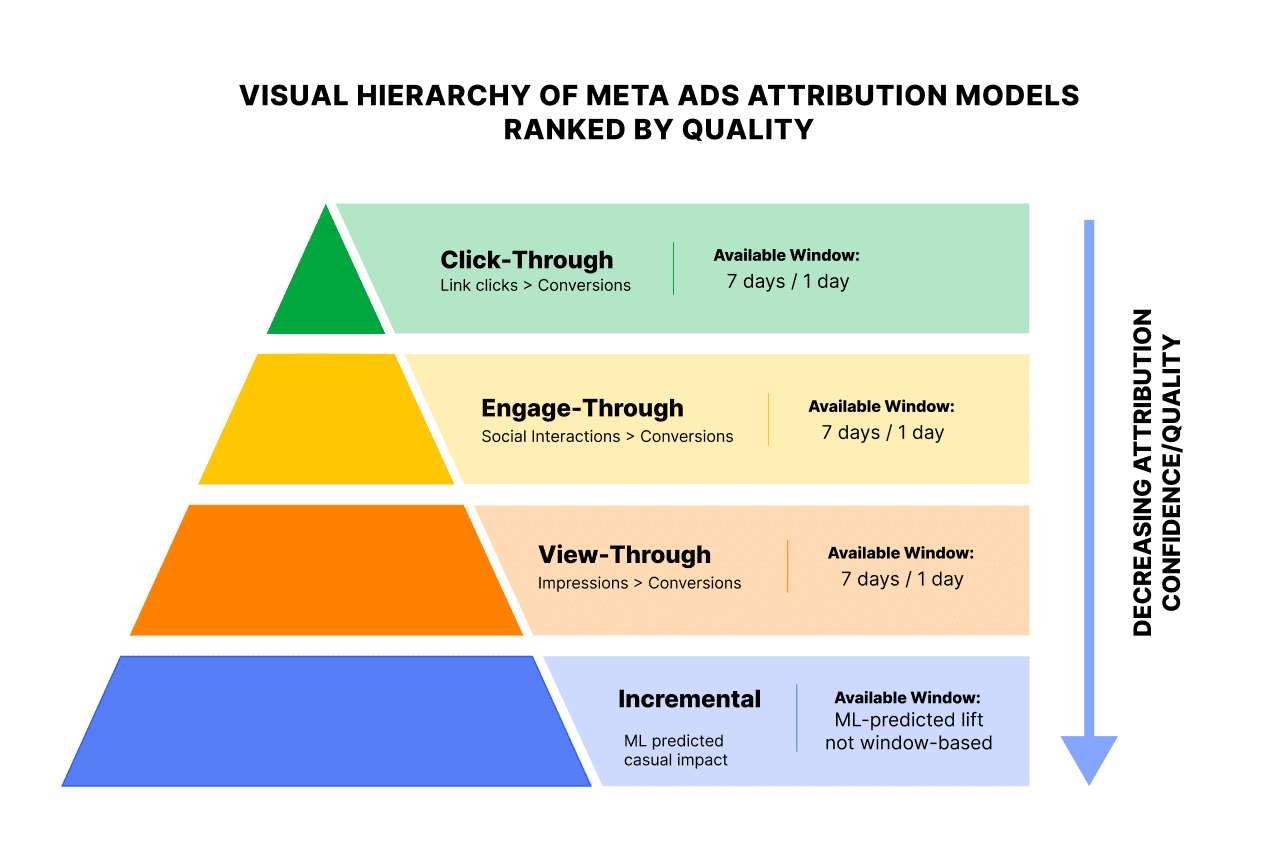
Meta now counts conversions across four distinct attribution types. They are not equal in quality, and treating them as the same number is one of the fastest ways to overstate performance.
1. Click-Through Attribution
A conversion is attributed as click-through when someone clicks a link in your ad and converts within your selected window (1-day or 7-day).
What changed in March 2026: Click-through now requires an actual link click. A click that sends someone to your website, lead form, app, or Messenger. Previously, Meta counted likes, shares, saves, and comments as "clicks" for attribution purposes. If someone tapped the heart icon on your ad Tuesday and bought your product Friday, that counted as a 7-day click-through conversion.
That's no longer the case. Only link clicks count.
This is the highest-quality attribution type. The person actively chose to leave Meta and visit your destination. The intent signal is strong.
2. Engage-Through Attribution (NEW in March 2026)
A conversion is attributed as engage-through when someone interacts with your ad socially (like, comment, share, save, or watches a video for 5+ seconds) and converts within 1 day.
This is the new category that replaced the old "engaged-view" model. It's broader than what came before. The old engaged-view only covered video views of 10+ seconds. Engage-through covers all non-link interactions plus video views at the new 5-second threshold.
The conversion window is fixed at 1 day. You can turn it on or off, but you can't extend it to 7 days. If someone saves your ad on Monday and buys on Wednesday, that conversion is not attributed under engage-through.
This is a medium-quality signal. The person engaged with your ad meaningfully, but they didn't click through to your site. The ad may have influenced the purchase, but the path wasn't direct.
3. View-Through Attribution
A conversion is attributed as view-through when someone is served an impression of your ad (without clicking or engaging) and converts within 1 day.
Meta defines an impression as any ad that is 50% in view for at least 1 second. That's a low bar. Someone scrolling past your ad quickly enough that they barely registered it can generate an impression. If they happen to purchase your product later that day, Meta counts it as a view through conversion.
This is the lowest-quality attribution type, and the most controversial one. Many experienced buyers remove it entirely from prospecting campaigns.
4. Incremental Attribution (Advanced)
This is a fundamentally different model that I'll cover in depth in the next section and in a separate dedicated article. Instead of counting every conversion within a time window, incremental attribution uses machine learning to estimate which conversions were actually caused by your ad vs. which would have happened anyway.
The March 2026 Changes: What Actually Happened
On March 3, 2026, Meta published "Simplifying Ad Measurement for a Social-First World" on its business blog. Three things changed:
1. Click-through narrowed to link clicks only.
All those social interactions (likes, shares, saves, comments) that used to count as "clicks" no longer qualify for click-through attribution. They moved to engage-through.
Why this matters: your click-through conversion numbers likely dropped after this change. That's not a performance decline. It's a reclassification. The conversions didn't disappear. They moved buckets.
2. Engage-through replaced engaged-view and got much broader.
The old engaged-view only applied to video ads (10+ second views). The new engage-through covers all ad formats: likes, shares, saves, comments, carousel swipes, and video views of 5+ seconds.
The conversion window is fixed at 1 day. This is important. Under the old system, a share followed by a purchase on day 5 was a 7-day click-through conversion. Now, that same share gives you only a 1-day engage-through window. If the purchase happens on day 2 or later, it's not attributed at all.
As Media Performance documented, some conversions genuinely disappear from your reports because of this gap.
3. Video engaged-view threshold dropped from 10 seconds to 5 seconds.
Meta's own data shows that 46% of Reels purchase conversions happen within the first 2 seconds of attention. The old 10-second threshold was calibrated for longer Facebook Feed videos and missed a lot of genuine engagement on short-form content.
The new 2026 default attribution setting is:
- 7-day click-through
- 1-day engage-through
- 1-day view-through
- Standard attribution model
- All conversions counted
Attribution Settings: What to Choose and Why
When you create an ad set, you'll find the attribution settings in the Budget and Schedule section. Here's what you're actually choosing and what it does.
Click-Through Window
Options: 1-day or 7-day
The 7-day window is standard for most e-commerce brands because purchase decisions typically happen within a week of the initial click. Switching from 7-day to 1-day typically reduces reported conversion volume by 30 to 40% for the same campaign. That's not because your ads stopped working. It's because you're excluding consideration purchases in the 2 to 7 day window.
My recommendation: Keep 7-day click for purchase events. The consideration window is real. Someone who clicks your ad Monday and buys Thursday was genuinely influenced by your ad. Use 1-day click for lead gen events where the conversion should happen in the same session (someone who clicks to download a free PDF but doesn't do it for 5 days probably found it elsewhere).
Engage-Through
Options: 1-day or None
Jon Loomer recommends keeping 1-day engage-through on for purchase events. A save, share, or video view shows interest and awareness. Even if the eventual purchase was driven by another channel, the initial engagement signals that the ad had impact.
For non-purchase events (leads, sign-ups, free downloads), consider turning engage-through off. If someone didn't click through to get your free resource, the ad's influence is debatable.
For retargeting campaigns, also consider removing engage-through. Remarketing audiences already have prior intent. Attributing a view or a like to a conversion in this audience inflates the numbers.
View-Through
Options: 1-day or None
This is the setting that causes the most confusion and debate. A 1-day view-through conversion means someone saw your ad (50% in view for 1 second), didn't click, didn't engage, and then converted within 24 hours.
For purchase events (especially higher-ticket items), there's a case for keeping it on. Someone browsing Instagram sees your ad for a product they were already considering, doesn't click, but goes to your site directly later and buys. The ad reminded them. That's a real thing.
For everything else, I'd strongly consider removing view-through. It's the attribution type most likely to inflate your numbers with conversions your ad didn't actually drive.
Standard vs. Incremental: The Two Attribution Models
On top of the window settings, Meta offers two attribution models:
Standard Attribution (default): Counts every conversion that occurs within your selected windows, regardless of whether your ad actually caused it. If someone was going to buy anyway but happened to see your ad first, standard attribution gives your ad full credit.
Incremental Attribution (advanced): Uses machine learning trained on Meta's library of Conversion Lift experiments to estimate which conversions were actually caused by your ad. It filters out organic demand.
When you select incremental attribution, you lose the ability to edit attribution windows. That makes sense. Incremental doesn't use time-based windows. It uses causal modeling.
Jon Loomer notes that in his testing, the difference between standard and incremental results has been modest. He recommends incremental as the better default for high-budget advertisers who have no trouble getting conversion volume, but wouldn't recommend it if you're already struggling to exit the learning phase.
Why Your Numbers Never Match Google Analytics
This is probably the most common frustration in Meta advertising, and now that you understand the attribution types, the explanation is pretty straightforward.
Different definitions of "click". Before March 2026, Meta counted social interactions as clicks. GA4 only counted link clicks. This created a persistent gap. The March 2026 change should narrow this gap significantly for click-through conversions.
Different attribution windows. GA4 defaults to data-driven attribution with a 90-day lookback for most channels but often uses last-click for paid social. Meta uses 7-day click + 1-day engage-through + 1-day view-through by default. These are fundamentally different measurement frameworks counting the same conversions differently.
View-through has no GA4 equivalent. GA4 doesn't track view-through conversions from Meta ads. If someone sees your Meta ad, doesn't click, and buys later, GA4 has no way to know the ad existed. Meta counts it. GA4 doesn't. This single difference can account for 15 to 30% of the gap between platforms.
Cross-device gaps. A user sees your ad on their phone at lunch. That evening, they buy from their laptop. Meta can sometimes connect these (if the user is logged into both devices). GA4 often can't, especially if cookies are blocked or consent is denied.
Privacy-driven signal loss. iOS restrictions, ad blockers, and cookie consent banners prevent Meta's Pixel from firing on a significant percentage of conversions. CAPI helps but doesn't recover everything. GA4 has its own gaps from the same issues but loses different conversions depending on implementation.
The bottom line: expecting the numbers to match is unrealistic. The systems are measuring overlapping but different things using different rules. The goal isn't reconciliation. The goal is understanding what each platform's numbers represent and using each for what it does best.
This is also why using a third-party tracker alongside Meta's reporting gives you a cleaner picture. Your tracker captures actual clicks and actual revenue, bypassing both Meta's and GA4's attribution quirks.
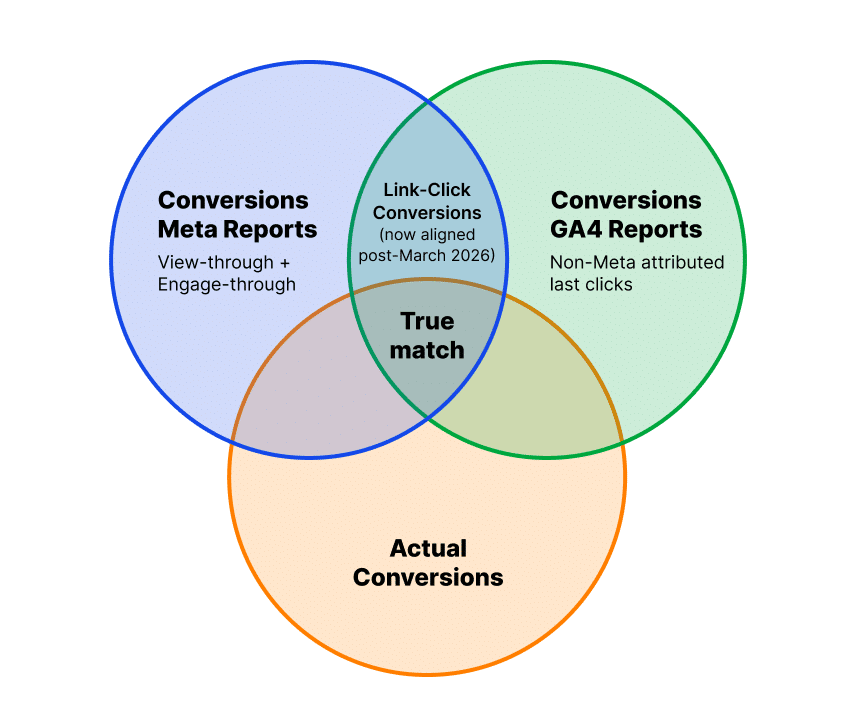
Why 100% of Conversions Will Never Match Ads Manager
Even with perfect tracking, your Ads Manager numbers will never match your actual business results 100%. Here's why:
1. Attribution overlap. The same conversion can be counted under multiple attribution types simultaneously. Someone who saw your ad (view-through), saved it (engage-through), and clicked the link (click-through) generates one purchase but can be counted in three attribution buckets. Meta deduplicates within a single ad set, but across ad sets and campaigns, the same conversion can be attributed multiple times.
2. Modeled conversions. A percentage of the conversions Meta reports are statistical estimates, not directly measured events. Post-iOS 14.5, Meta uses modeling to fill gaps in tracking. You can't distinguish modeled from real conversions in Ads Manager.
3. Pixel + CAPI gaps. Even with both configured, Pixel-only tracking captures roughly 40 to 60% of conversions. CAPI adds 25 to 40% accuracy. But there's still a gap, especially on browsers with aggressive cookie blocking.
4. Time zone misalignment. Your ad account time zone, your business time zone, your customer's time zone, and your analytics tool's time zone may all differ. A purchase at 11:55 PM might land on different "days" depending on which system you check.
5. Return and cancellation lag. Meta counts a conversion the moment it fires. If the customer returns the product or cancels the subscription 3 days later, Meta still shows it as a conversion. Your revenue systems don't.
6. Cross-channel attribution claims. If a customer clicked a Google ad, saw a Meta ad, and then converted, both Google and Meta will claim credit for the conversion. Your actual business only got one sale.
Don't chase a perfect match.
The goal is understanding the directional accuracy of each platform's numbers and building a system that makes decisions based on the most reliable data available. For many performance buyers, that means combining Meta's reporting with tracker data and building automation rules on the combined picture inside TheOptimizer.
How Attribution Settings Affect Campaign Performance
This is the part most people miss. Attribution isn't just about reporting. It directly affects how Meta delivers your ads.When you change your attribution settings, you're changing what Meta's algorithm counts as a "success." And that changes who it shows your ads to.
Wider attribution windows = more reported conversions = more data for the algorithm = broader delivery
A 7-day click + 1-day engage-through + 1-day view-through setting gives Meta the most conversion signals to learn from. It can optimize more aggressively because it has more data points. Your reported numbers will look better, but some of those attributed conversions may not have been caused by your ad.
Narrower windows = fewer reported conversions = less data = potentially constrained delivery.
Switching to 1-day click only (no engage-through, no view-through) dramatically reduces the conversion signals Meta has to work with. If this drops you below the ~50 conversions/week threshold, you'll land in "Learning Limited" and performance becomes erratic.
The practical impact:
As Jon Loomer explains, removing view-through attribution from a campaign will reduce reported results but force the algorithm to optimize toward higher-intent users (people who actually click). This can improve the quality of your conversions while reducing the quantity in your reports.
The tradeoff is real. Wider attribution inflates your numbers but gives the algorithm more room. Narrower attribution gives you cleaner data but constrains the algorithm. There's no universally correct answer. It depends on your campaign objectives and how you use the data.
This is also why having automation rules that can use tracker data alongside Meta data is so valuable. You can let Meta optimize with wider attribution windows (giving it more signal) while making your stop-loss and scaling decisions based on confirmed revenue from your tracker. Best of both worlds.
How to Shift Your Optimization Approach by Attribution Model
If you're using Standard Attribution (7-day click, 1-day engage-through, 1-day view-through):
This is the default and it works well for most advertisers. Your optimization approach:
- Use the full reported conversion volume for budget decisions and scaling
- Be aware that 15 to 30% of your reported conversions may be view-through (low quality)
- Use the "Compare Attribution Settings" feature in Ads Manager to see how conversions break down by type
- Cross-reference with your tracker or GA4 before making major budget changes. If Meta says 50 conversions but your tracker says 35, the truth is probably closer to 35
- Build your automation rules using tracker ROI when available, not just Meta's reported numbers
If you're using Standard Attribution with narrower windows (1-day click only):
- Expect 30 to 40% fewer reported conversions
- Your CPA in Ads Manager will look higher (same spend, fewer counted conversions)
- Don't panic. Your actual business results haven't changed. Only the reporting changed
- Check that you're still getting enough conversions to exit learning phase (50/week per ad set)
- This is a good approach for lead gen where the conversion should happen same-session
If you're using Incremental Attribution:
- Expect fewer reported conversions than standard (incremental filters out organic demand)
- Your "true CPA" will be higher but more honest
- Don't compare incremental CPA directly to standard CPA. They're measuring different things
- Incremental is best for high-budget campaigns where you have plenty of conversion volume
- Use it to identify which campaigns are actually driving new business vs. taking credit for organic
- Early data suggests incremental attribution volumes fall between 7-day click and 1-day click in terms of reported conversions
Regardless of which model you use, having a system that manages your campaigns 24/7 based on real performance data is what prevents attribution confusion from turning into budget waste. TheOptimizer pulls data from both Meta and your tracker, giving you the combined picture that neither source provides alone.
Recommended Settings by Campaign Type
Important:
Changing attribution on a live campaign can restart the learning phase. If a campaign is performing well, clone the ad set and test the new settings on the clone rather than modifying the live one.
FAQ
My click-through conversions dropped after March 2026 but I didn't change anything. Why?
Meta redefined click-through to require actual link clicks. Social interactions (likes, shares, saves) that used to count as clicks now fall under engage-through attribution. Your conversions didn't disappear. They moved to a different bucket. Add the engage-through column to your reports to see the full picture.
Should I turn engage-through on or off?
For purchase events, keep it on. For lead gen events where the conversion should happen in the same session, consider turning it off. For retargeting campaigns, strongly consider turning it off since these audiences already have prior intent and engage-through attribution tends to inflate retargeting numbers.
Why does Meta show more conversions than Google Analytics?
Three main reasons: Meta counts view-through conversions (GA4 doesn't), Meta uses different attribution windows, and before March 2026, Meta counted social interactions as clicks. The March changes should narrow the click-through gap, but view-through attribution will always create a difference.
Can I see how my conversions break down by attribution type?
Yes. Use the "Compare Attribution Settings" feature in Ads Manager. It shows how your conversions distribute across click-through, engage-through, and view-through windows without changing your live settings.
Does changing attribution settings affect my ad delivery?
Yes. Attribution settings change what Meta's algorithm counts as a success, which changes who it shows your ads to. Narrower windows mean fewer signals and potentially constrained delivery. Wider windows give the algorithm more data to optimize against.
What's the "right" attribution setting?
There isn't one universal answer. The right setting depends on your campaign objective, your conversion volume, and how you use the data. The recommendations table above is a starting point. Use "Compare Attribution Settings" to understand the impact before changing anything on live campaigns.