Meta Ads Ad Set Budget Sharing: What It Is, When to Use It, and When to Turn It Off

Before getting into budget sharing, let's make sure the foundation is clear.
Meta gives you two places to set your budget: at the campaign level or at the ad set level.
Campaign Budget (CBO / Advantage+ Campaign Budget): You set one budget for the entire campaign. Meta distributes that budget across your ad sets automatically based on where it predicts the best results. This means Meta might put 70% of your budget into one ad set and 10% into another if it believes that's where the conversions are. You give up control over per-ad-set spend in exchange for Meta's optimization.
Ad Set Budget (ABO): You set a separate budget for each ad set. Each one gets its own fixed daily amount. If Ad Set A gets $100/day and Ad Set B gets $100/day, that's what they'll spend (roughly), regardless of which one is performing better.
CBO is good when you want Meta to chase performance across ad sets. ABO is good when you want controlled testing with equal spend per audience or creative.
Use campaign budget when you have multiple ad sets and want Meta to push more spend toward the stronger one. Use ad set budget when you want stricter control, cleaner tests, or you need to protect spend across audiences.
The problem with ABO has always been that it's rigid. One ad set might be performing well and hitting its budget cap by 2 PM, while another is barely spending and delivering weak results. Your budget is locked on both sides. The strong ad set can't spend more, and the weak one keeps spending its allocation anyway.
Ad set budget sharing is Meta's attempt to fix that rigidity without going full CBO.
What Is Ad Set Budget Sharing?
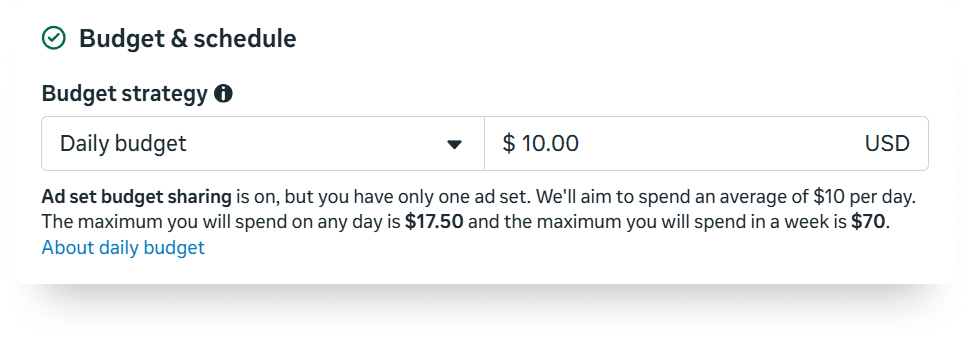
Ad set budget sharing is a feature that lets Meta redistribute up to 20% of one ad set's daily budget to another ad set within the same campaign when it predicts better performance.
According to Meta's documentation: "We'll share up to 20% of your ad set budget with other ad sets within this campaign when it's likely to improve performance."
Here's how it works in practice. Say you have two ad sets in a campaign, each with a $100/day budget:
- Without budget sharing: Each ad set spends up to $100. Total possible spend: $200.
- With budget sharing: If Meta believes Ad Set A has better opportunities, it can take up to $20 from Ad Set B's budget and shift it to Ad Set A. Ad Set A now has up to $120. Ad Set B has $80. Total campaign spend stays the same.
It's a middle ground. You still set individual ad set budgets (unlike CBO where Meta controls everything), but you give the algorithm a little room to shift money toward what's working.
LeadEnforce's analysis describes it well: "Budget sharing allows Meta to move up to 20% of one ad set's daily budget into another active ad set inside the same campaign. The total campaign spend does not increase. Meta simply redistributes part of the budget toward stronger opportunities in real time."
This relates directly to the campaign structure decisions we covered in our campaign structure best practices guide. If you're running ABO for creative testing, budget sharing adds a layer of flexibility that can improve your results without giving up the control that makes ABO useful for testing in the first place.
When Is Budget Sharing Active (and When to Keep It On)
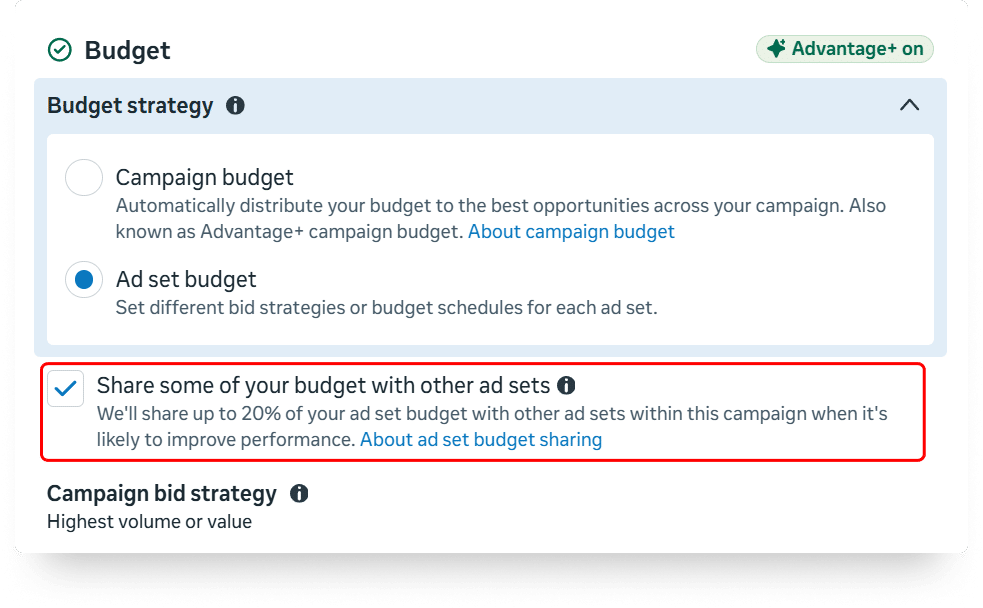
Budget sharing appears as a checkbox when you're using ad set budgets with two or more ad sets. In some accounts, it's checked by default on new campaigns. In others, it's opt-in. Check your ad set settings to confirm.
Keep it on when:
- You're running multiple ad sets that target similar or overlapping audiences and you want Meta to lean into whichever one is performing better on a given day.
- You're in a scaling phase and want slightly more algorithmic flexibility without fully switching to CBO.
- You're running broad targeting with diverse creatives across ad sets and want the budget to follow performance.
Think of it as ABO with a soft CBO layer on top. You still control the base budget per ad set. But Meta gets permission to move up to 20% around based on real-time performance signals.
For campaigns where you want the algorithm to have room to optimize but you're not ready to give up ad set level budget control entirely, budget sharing is a solid option.
How and When to Disable Ad Set Budget Sharing
Disabling is simple. Go to your campaign settings, find the budget sharing checkbox, and uncheck it.When to turn it off:
- During controlled A/B tests. If you're testing two audiences or two creative sets against each other, you need equal spend per ad set. Budget sharing breaks that controlled environment by shifting money toward whichever ad set shows early signals, which can skew your test results before you have enough data.
- When testing bidding strategies. If you're comparing cost cap vs. bid cap across ad sets (which we covered in our bidding strategies article), budget sharing can muddy the results. One ad set getting 20% more budget than the other makes it hard to attribute performance differences to the bidding strategy alone.
- When you have very different audience sizes across ad sets. If Ad Set A targets a broad audience and Ad Set B targets a small retargeting list, budget sharing might drain the retargeting budget toward the broader audience since it has more opportunities. That's not necessarily better. Your retargeting audience might have higher conversion quality even if it can't absorb more spend.
- When you're running TheOptimizer's automation rules on per-ad-set budgets. If you've set up automation rules that adjust budgets based on ad set performance (for example, increasing budget by 20% when ROI is stable), budget sharing might affect the total spend of the ad set. The rule changes the budget based on the ad set's performance, but in the meantime Meta is silently shifting 20% to or from that ad set. The two systems can work against each other.
For campaigns managed through TheOptimizer, I generally recommend disabling budget sharing and letting the automation rules handle budget allocation instead. TheOptimizer's rules run every 10 minutes with explicit logic you've defined, whereas budget sharing operates on Meta's internal predictions with no transparency into why it shifted the money.
The Impact on Campaign Spend
This is the part most people miss. Budget sharing doesn't just move money between ad sets. It can also affect how much you spend on a given day.
Segwise's budget analysis found a critical detail: "If you have turned on ad set budget sharing, you may spend up to 75% over the total of your daily budget plus the maximum shared budget per day."
That's worth reading twice.
Without budget sharing, Meta can already spend up to 25% over your daily ad set budget on high-opportunity days (a $100 budget might hit $125). With budget sharing enabled, that overspend cap increases to 75%.
So a $100 daily budget with sharing enabled could theoretically hit $175 on a strong day.
Meta balances this over a 7-day window. Your weekly spend won't exceed 7x your daily budget. But the day-to-day fluctuations can be more extreme with sharing turned on.
What this means for budget planning:If you set ad set budgets with the expectation that each one will spend roughly its daily amount, budget sharing can introduce surprises. One ad set might spend 40% over its budget on a Tuesday while another spends 30% under. Over the week, it evens out, but on a daily basis the numbers look volatile.
For advertisers who need predictable daily spend (client-managed accounts with fixed daily caps, or campaigns where overspend triggers compliance issues), this matters. Turn sharing off and accept the trade-off of slightly less algorithmic flexibility.
FAQ
Is ad set budget sharing the same as Campaign Budget Optimization (CBO)?
No. CBO gives Meta full control over budget distribution across ad sets. Budget sharing still lets you set individual ad set budgets but allows Meta to move up to 20% between them. CBO can put 90%+ of your budget into one ad set. Budget sharing caps the redistribution at 20%
Does budget sharing increase my total campaign spend?
No. The total campaign spend across all ad sets stays the same. What changes is how that total is distributed. However, the daily overspend cap per ad set increases from 25% to 75% with sharing enabled, so individual ad sets can spend significantly more on a given day (balanced over the week).
Can I use budget sharing with only one ad set?
No. You need at least two ad sets in the campaign for the feature to appear. With only one ad set, there's nothing to share with.
Does budget sharing work with Advantage+ campaigns?
Budget sharing is available when using ad set budgets. In Advantage+ campaigns, campaign budget (CBO) is selected by default. You need to switch to ad set budgets to access the sharing option.
Should I use budget sharing or just switch to CBO?
If you want Meta to have full flexibility with budget allocation, use CBO. If you want to maintain base budget control per ad set with some flexibility, use ABO with budget sharing. If you want strict per-ad-set spend control (testing, client-managed budgets), use ABO with sharing turned off.
How do I know if budget sharing helped or hurt my campaign?
Compare your ad set spend distribution against performance. If the ad set that received extra budget also delivered better CPA and ROAS, sharing helped. If it just consumed more budget at the same or worse efficiency, sharing likely didn't add value. Review this weekly, not daily, since daily fluctuations are normal.