Meta Ads Bidding in 2026: Cost Cap vs. Bid Cap (and when to use each)

Before talking about bidding strategies, you need to understand what you're actually bidding in.
Every time there's an opportunity to show an ad to someone, Meta runs an auction. Your ad competes against every other eligible ad targeting that same person. But the winner isn't simply the highest bidder.
Meta calculates a Total Value Score for each ad:
Total Value = (Your Bid x Estimated Action Rate) + Ad Quality + User Value
Three things matter. Your bid (how much you're willing to pay). The estimated action rate (how likely this specific person is to take the action you're optimizing for). And ad quality (how relevant and engaging your creative is based on past signals).
This means a lower bid with a highly relevant ad can beat a higher bid with a poor one. Your creative quality and relevance score are multipliers on your bid. A $20 bid with strong relevance can outperform a $40 bid with weak relevance.
Your bidding strategy controls one piece of this equation: how Meta decides what to bid on your behalf. Everything else (creative quality, audience relevance) is determined by your ads and your account history.
The 5 Bidding Strategies Available in 2026
Meta offers five bidding strategies in 2026. Three are goal-based (they control cost), and two are spend-based (they control volume).
1. Highest Volume (formerly Lowest Cost)
What it does: Meta bids whatever it takes to get you the most results within your budget. No cost control. No cap. It just spends your budget as efficiently as it can.
The upside: Maximum delivery. Fastest exit from the learning phase. Zero setup. It's Meta's default for a reason.
The downside: Your CPA fluctuates. Monday might be $25, Tuesday $55, Wednesday $30. You have no cap, so when competition spikes (holidays, weekends, industry events), your costs spike with it. Meta doesn't care about your profit margins. It cares about spending your budget.
Best for: New campaigns, new accounts, data collection phases, and situations where volume matters more than per-unit cost.
2. Highest Value
What it does: Instead of maximizing the number of conversions, Meta maximizes the total conversion value. It finds people likely to make bigger purchases rather than more purchases.
The upside: Higher average order value. Better for e-commerce with a wide product price range.
The downside: Requires purchase value data sent through your pixel or Conversions API. Without it, Meta has nothing to optimize against.
Best for: E-commerce stores where order values vary significantly ($20 t-shirt vs. $200 jacket). Useless for lead gen or flat-value conversions.
3. Cost Cap
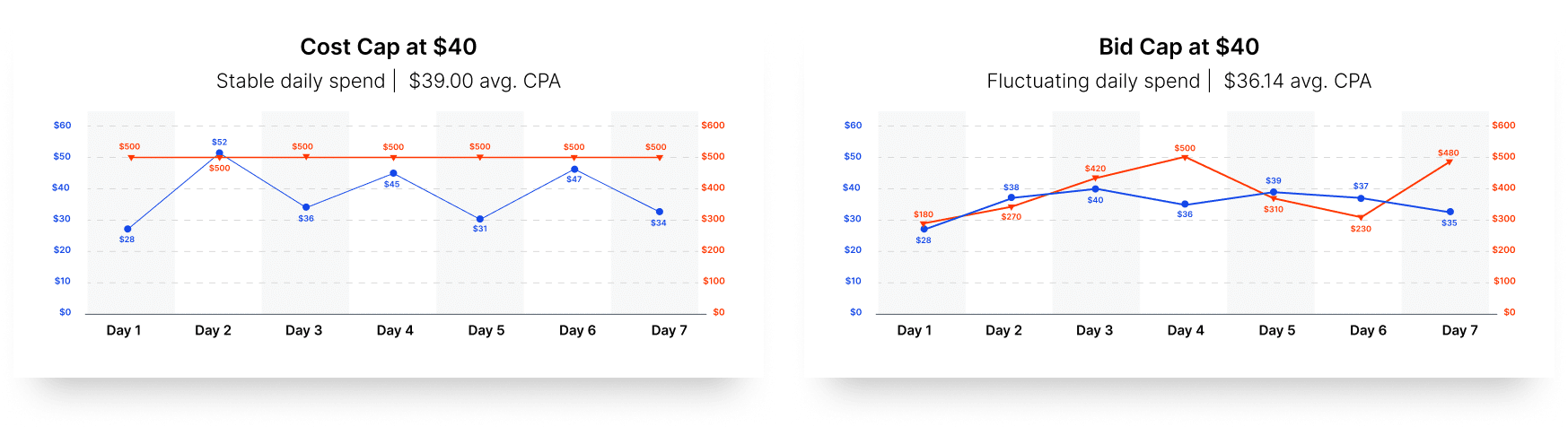
What it does: You set a target CPA, and Meta tries to keep your average cost per result at or below that target. Key word: average. Individual conversions might cost more or less, but the average should hover around your cap.
The upside: Predictable costs over time. Meta still has flexibility to bid above your cap when it finds high-probability users, as long as the average stays in line.
The downside: During the learning phase, costs can exceed your cap significantly before stabilizing. A lot of people burn their hands at cost caps because they expect it to behave like bid caps. Cost cap is an average, not a ceiling.
Best for: Scaling campaigns where you want to maintain profitability without micromanaging bids. Ideal when you know your target CPA but want Meta to have room to find volume.
4. Bid Cap
What it does: You set the maximum amount Meta can bid in any single auction. If winning an impression would require bidding above your cap, Meta doesn't bid. Period.
The upside: Hard cost control. Your CPA will never exceed your cap (on a per-auction basis). As Mathias Schrøder told Ads Uploader: "Last year was our most profitable year ever. We made a deliberate shift to prioritize profit over revenue. Bid caps were central to that strategy."
The downside: Your spend becomes the variable instead of your CPA. Some days you'll only spend $200 of a $500 budget because Meta couldn't find enough auctions to win at your price. Delivery can stall completely if your cap is too low.
Best for: Advertisers who know their exact break-even CPA and prioritize profitability over volume. Requires data and experience.
5. Minimum ROAS (Return on Ad Spend)
What it does: You set a minimum ROAS threshold (say, 2.5x), and Meta only bids on auctions where it predicts the purchase will meet or exceed that return.
The upside: Directly ties bidding to revenue outcomes, not just cost.
The downside: Needs high purchase volume for the algorithm to predict accurately. Not available for non-purchase optimization events.
Best for: E-commerce brands with strong purchase data who want to guarantee a minimum return threshold.
Cost Cap vs. Bid Cap: The Real Differences
This is the comparison most people get wrong, so let me be very specific about what's different.
The fundamental mental model:With cost cap, you're telling Meta: "Spend my budget, but try to keep the average cost around $X."With bid cap, you're telling Meta: "Only compete in auctions where you can win for $X or less. If you can't find enough of those, spend less."The trade-off is always volume vs. control. Cost cap gives you more volume with less precise control. Bid cap gives you more control with less predictable volume.
When to Use Each Bidding Strategy
Here's the practical decision framework I use:
Phase 1: Discovery (new campaign, new offer, new account)
Use Highest Volume. You don't know your CPA yet. You don't know which creatives work. You need data fast. Let Meta spend freely and collect baseline numbers. Stay here for 7 to 14 days or until you have at least 50 conversions.
Phase 2: Optimization (you know your numbers)
Switch to Cost Cap. You now have a baseline CPA and you want to maintain it while scaling. Set your cost cap at your target CPA (not your break-even, your target). This gives Meta flexibility to find more volume while keeping your average cost in check.
If your CPA starts creeping above target despite the cost cap, it usually means competition is rising or your creatives are fatiguing.See our article on detecting creative fatigue early for the specific automation rules to catch this.
Phase 3: Profitability (you want to protect margins)
Switch to Bid Cap. You know exactly what a customer is worth and what you can afford to pay. Set the cap at your maximum acceptable CPA with a 10 to 20% buffer for auction competition. Accept that you'll spend less budget but at better unit economics.
Phase 4: Value optimization (e-commerce with varied AOV)
Layer in Minimum ROAS or Highest Value. These only make sense when you have strong purchase value data and want to optimize for revenue, not just conversion count.
The transition principle:
You don't pick a strategy and stick with it forever. You graduate from one to the next as your data matures. As Stackmatix's analysis found: "You switch strategies based on performance signals, not a calendar."
This phased approach aligns with the campaign lifecycle framework in our Meta Ads automation playbook: launch with broad settings, validate with data, then tighten controls as you scale.
Can I Use Cost Cap or Bid Cap on a Brand New Account?
Short answer: you can, but you probably shouldn't.Cost cap and bid cap both rely on Meta having enough data to predict conversion probabilities. On a brand new account with zero conversion history, Meta is guessing. And guessing with a bid cap usually means one of two things:
- Your cap is too low. Meta can't find enough auctions to win at your price. Your campaign delivers almost nothing. You waste days wondering why you're spending $12 of a $500 budget.
- Your cap is too high. You're not actually constraining anything. You might as well use Highest Volume.
Bid cap during the learning phase slows data collection and can destabilize optimization. Complete the learning phase with Highest Volume, gather at least 50 conversions, confirm your baseline CPA, then activate a bid cap strategy.The recommended path for new accounts:
- Start with Highest Volume for 2 to 3 weeks
- Accumulate at least 50 conversions (ideally 100+)
- Calculate your baseline CPA from that data
- Switch to Cost Cap at your target CPA
- Run for another 2 to 3 weeks to validate
- If you want tighter control, test Bid Cap at a level informed by your proven CPA
There's one exception. If you have a mature pixel with strong historical data (from a previous account, a pixel migration, or extensive Conversions API data), you can start with Cost Cap because Meta's prediction models aren't starting from zero.
How Bidding Strategies Work With Value Rules
Value rules, which we covered in detail in our Meta Ads value rules guide, are bid multipliers that adjust how much Meta bids for specific audience segments. They work on top of your bidding strategy.
Here's how the interaction plays out:
Highest Volume + Value Rules: Meta bids freely to maximize conversions, but bids +40% more for your high-LTV demographic. You'll get more conversions from that segment, but your overall CPA will rise because of the higher bids. No ceiling on how much you'll pay.
Cost Cap + Value Rules: Meta tries to keep your average CPA at your target while also bidding more for high-value segments. The cost cap provides a safety net that value rules alone don't offer. This is the combination I see the best results from. You get segment prioritization with cost guardrails.
Bid Cap + Value Rules: Meta won't bid above your cap in any auction, and within that ceiling, it bids more aggressively for your priority segments. This is the tightest control: hard ceiling on cost, with directional steering toward better customers. The risk is that your effective bid for non-priority segments might be too low for any delivery.
The general principle: Value rules tell Meta WHO is worth more. Your bidding strategy tells Meta HOW MUCH you're willing to pay overall. They're complementary controls. Use the bidding strategy to set the boundaries, then use value rules to steer within those boundaries.
One of the benefits of using Value Rules is that it allows you to consolidate your ad sets. Instead of creating separate ad sets for each demographic with different budgets, you keep one ad set and let the bidding strategy plus value rules handle the distribution.
The Campaign Structure for Testing Bidding Strategies
Don't test bidding strategies by switching mid-campaign. That resets the learning phase and gives you messy data. Instead, run a proper A/B test.
The structure:Create two identical campaigns. Same creatives. Same targeting. Same budget. Same optimization event. The only difference: the bidding strategy.
Campaign A: Cost Cap at $X
Campaign B: Bid Cap at $YRun both for at least 14 days. Compare:
- Total conversions
- Average CPA
- Total spend (especially for bid cap, which may not spend full budget)
- Conversion quality (match against CRM or tracker data)
- Cost per quality conversion (not just any conversion)
What most people miss:
The campaign that "wins" on CPA might not win on total profit. Cost cap might give you 100 conversions at $45 CPA ($4,500 spend). Bid cap might give you 60 conversions at $38 CPA ($2,280 spend). Cost cap spent more and got more conversions. Bid cap was cheaper per conversion but generated less total volume. Which is better depends on your margins and capacity.
If you're also testing creatives alongside bidding strategies, use the two-campaign structure we recommend: separate testing campaign (ABO) for creative validation, separate scaling campaign (CBO) for the bidding strategy test. Don't test creatives and bidding strategies in the same campaign. Too many variables.
A note on Advantage+ Shopping:
ASC uses its own automated bidding logic. If you're running ASC, your bidding strategy options are limited. You can set a cost-per-result goal (similar to cost cap) but you can't use bid cap inside ASC. If you want to test bid cap vs. cost cap specifically, use manual campaign types.
What Data Your Pixel Needs for Each Bidding Model
Your bidding strategy is only as good as the data feeding it. Meta's algorithm uses your conversion event data to predict who will convert and at what cost. Feed it garbage, and even the best bidding strategy will underperform.
For Highest Volume and Cost Cap:Minimum requirement: a properly configured Pixel + Conversions API tracking your optimization event (Purchase, Lead, etc.). You need at least 50 events per week per ad set for the algorithm to optimize effectively.
The more upstream events you send (PageView, ViewContent, AddToCart, InitiateCheckout, Purchase), the more data the algorithm has to predict conversion probability. Don't just send the final conversion event. Send the full funnel.
For Bid Cap:Same requirements as above, plus you need enough historical conversion data to know your actual CPA before setting a cap. If you set a bid cap without at least 50 to 100 historical conversions to reference, you're guessing.
For Highest Value and Minimum ROAS:These strategies require purchase value data sent with every conversion event. If your pixel fires Purchase without a value parameter, Meta can't optimize for value. Make sure your purchase event includes the actual transaction amount, not a static placeholder value.
For all strategies:
Conversions API is essential in 2026. Browser-only Pixel tracking misses 20 to 40% of conversions due to iOS restrictions, ad blockers, and cookie consent. CAPI sends conversion data server-side, giving Meta a more complete and accurate signal set. Better data means better bid predictions, which means all bidding strategies perform better.
Check your Event Match Quality (EMQ) score in Events Manager. Anything below 6 out of 10 means Meta is struggling to match events to users. This directly affects how accurately Meta can predict conversion probability, which is the foundation of every bidding strategy.
How to Use Cost Cap and Bid Cap With Third-Party Automation Tools
Here's where things get interesting. Your bidding strategy controls what happens inside the auction. But what happens outside the auction, the campaign management layer, is equally important.Cost cap and bid cap both have blind spots:
- Cost cap won't pause a campaign that's been unprofitable for 3 days straight. It just keeps averaging.
- Bid cap won't increase your daily budget when it's consistently winning auctions below your cap (meaning there's room to scale).
- Neither will detect creative fatigue and alert you that your CTR dropped 30% this week.
- Neither can pull real revenue data from your Voluum or RedTrack tracker and compare it against what Meta reports.
- Neither will clone your winning campaign to another ad account for horizontal scaling.
This is where third-party API tools like TheOptimizer fill the gap. They manage the campaign lifecycle around your bidding strategy.Here's how they work together.
Cost Cap + TheOptimizer:
You set a cost cap of $40. TheOptimizer runs alongside with rules like:
- IF CPA exceeds $50 for 3 consecutive days (despite the cost cap), pause the campaign and alert you
- IF CPA has been stable below $35 for 7 days, increase the daily budget by 20%
- IF CTR dropped 25%+ from baseline, pause the fatigued creative before it drives CPA up
- IF tracker ROI is below -20% (even though Meta shows positive ROAS), flag the discrepancy
The cost cap handles per-auction bidding. TheOptimizer handles everything after: budget management, performance protection, creative health, and real revenue validation.
Bid Cap + TheOptimizer:
You set a bid cap of $38. TheOptimizer adds:
- IF campaign only spent 40% of daily budget (not enough winning auctions), alert you to consider raising the cap
- IF campaign is winning auctions at 20%+ below your cap consistently, consider lowering the cap to improve margins further
- IF a specific creative is generating conversions at 50% below your cap, clone the campaign to capture more volume at that price point
- IF campaign has been running for 14 days and CPA is stable, scale the budget to capture more of the available auctions
The automation rules I use for this are the same ones covered in our 8 automation rules for scaling Meta Ads safely. They work with any bidding strategy because they operate at the campaign management layer, not the auction layer.
The key insight: bidding strategies and automation tools aren't competing solutions. They operate at different levels of the stack. Your bidding strategy tells Meta how to bid. Your automation tool tells you (and acts on) whether the campaign is actually working.
TheOptimizer connects to Meta's API and runs rules every 10 minutes across all your ad accounts. It also integrates with trackers like Voluum, RedTrack, Binom, and ClickFlare, so your automation rules can use confirmed revenue data instead of Meta's modeled attribution. That matters especially for bid cap campaigns where you need accurate unit economics to set the right cap.
FAQ
What's the default bidding strategy on Meta Ads?
Highest Volume (formerly called Lowest Cost). Meta spends your budget to get the most results at the lowest possible cost. No cap on what it pays per conversion. This is the right starting point for most new campaigns.
Should I use cost cap or bid cap for e-commerce?
For most e-commerce campaigns, start with cost cap. It gives you cost predictability while maintaining delivery volume. Switch to bid cap only when you have strong CPA data (50+ conversions) and want to prioritize per-unit profitability over total volume. For high-AOV products, consider Minimum ROAS instead.
Can I switch bidding strategies mid-campaign?
Technically yes, but it resets the learning phase. Meta's system recalibrates when you change strategies, and performance may be unstable for 3 to 5 days. Better to create a new campaign with the different strategy and run it as a test alongside the original.
What bid cap should I set?
Start at 10 to 20% above your proven CPA. If your average CPA is $40, set your bid cap at $44 to $48. Too tight and you won't get delivery. Too loose and you're not actually constraining anything. Adjust weekly based on delivery volume and CPA results.
Why is my bid cap campaign not spending?
Your cap is likely too low for the current auction competition. Either raise it by 10 to 15%, or check whether your creatives and targeting are limiting the pool of auctions Meta can enter. Low ad quality scores also reduce your competitiveness at a given bid level.
Does changing my bidding strategy affect my pixel data?
No. Your pixel continues tracking the same events regardless of bidding strategy. What changes is how Meta uses that data to decide how much to bid. Better pixel data (Conversions API, high EMQ score, full funnel events) improves performance under any bidding strategy.
How do bidding strategies interact with CBO (Campaign Budget Optimization)?
In a CBO campaign, Meta distributes your budget across ad sets based on performance. Your bidding strategy applies at the ad set level within that campaign. Cost cap or bid cap limits how much Meta pays per conversion within each ad set, while CBO decides how much budget each ad set gets.
Is manual bidding still an option in 2026?
Meta has largely deprecated true manual bidding for conversion campaigns. The goal-based strategies (Highest Volume, Cost Cap, Bid Cap, Minimum ROAS) are how you exert control within the automated auction. Bid Cap is the closest thing to manual bidding that still exists and tools like TheOptimizer help you tweak bids automatically based on specific performance thresholds.