Why Your Meta Ads Stopped Working in 2026 (And What to Do About It)

$250+ spent. Zero conversions. Sound familiar?I
've seen thousands of Meta ad accounts over the past few years. The pattern is almost always the same. It's never one massive screw-up. It's 2 or 3 things stacking on top of each other, quietly draining budget while you're focused somewhere else.
And the worst part is that most of these issues are invisible inside Ads Manager. Your dashboard shows clicks coming in. Maybe even a few conversions. But when you check your CRM, your leads, Shopify orders, or your finalized P/L reports the numbers don't match. Something is off, and you can't figure out what.
Before you blame Meta, blame the algorithm, or start questioning your offer, let me walk you through the real reasons accounts break down. Not the beginner stuff like "pick the right objective." I'm talking about the issues that experienced buyers run into when accounts that were printing suddenly go sideways.
Your Conversion Data Is Lying to You
I'm going to start here because everything else depends on this. If your tracking is broken, every optimization decision you make is based on garbage data.
And garbage in, garbage out.The tricky part is that broken tracking doesn't look broken. Your Events Manager still shows events firing. Conversions still appear in your dashboard. But those numbers are inflated, duplicated, or completely disconnected from reality.
Here's what's actually happening in most accounts I've seen:
Double-counting from Pixel + CAPI without deduplication. This is by far the most common issue. You set up Conversions API (which you should), but you didn't implement event_id deduplication. So every purchase fires twice. Meta sees twice the conversions, optimizes for the wrong user profiles, and your reported CPA looks half of what it actually is. Meanwhile, you're celebrating numbers that don't exist.
Ghost/test conversions from admin traffic. Your dev team, your marketing team, you personally, all hitting the thank-you page while testing. Each visit fires a conversion event. I've seen accounts where 15 to 20% of reported conversions were internal traffic.
Events firing at the wrong funnel stage. A Purchase event firing on the product page instead of the order confirmation. An Add to Cart event triggering on page load instead of on button click. These seem minor. They're not. Meta's algorithm optimizes delivery based on who triggers these events. Feed it the wrong signals and it finds the wrong people.
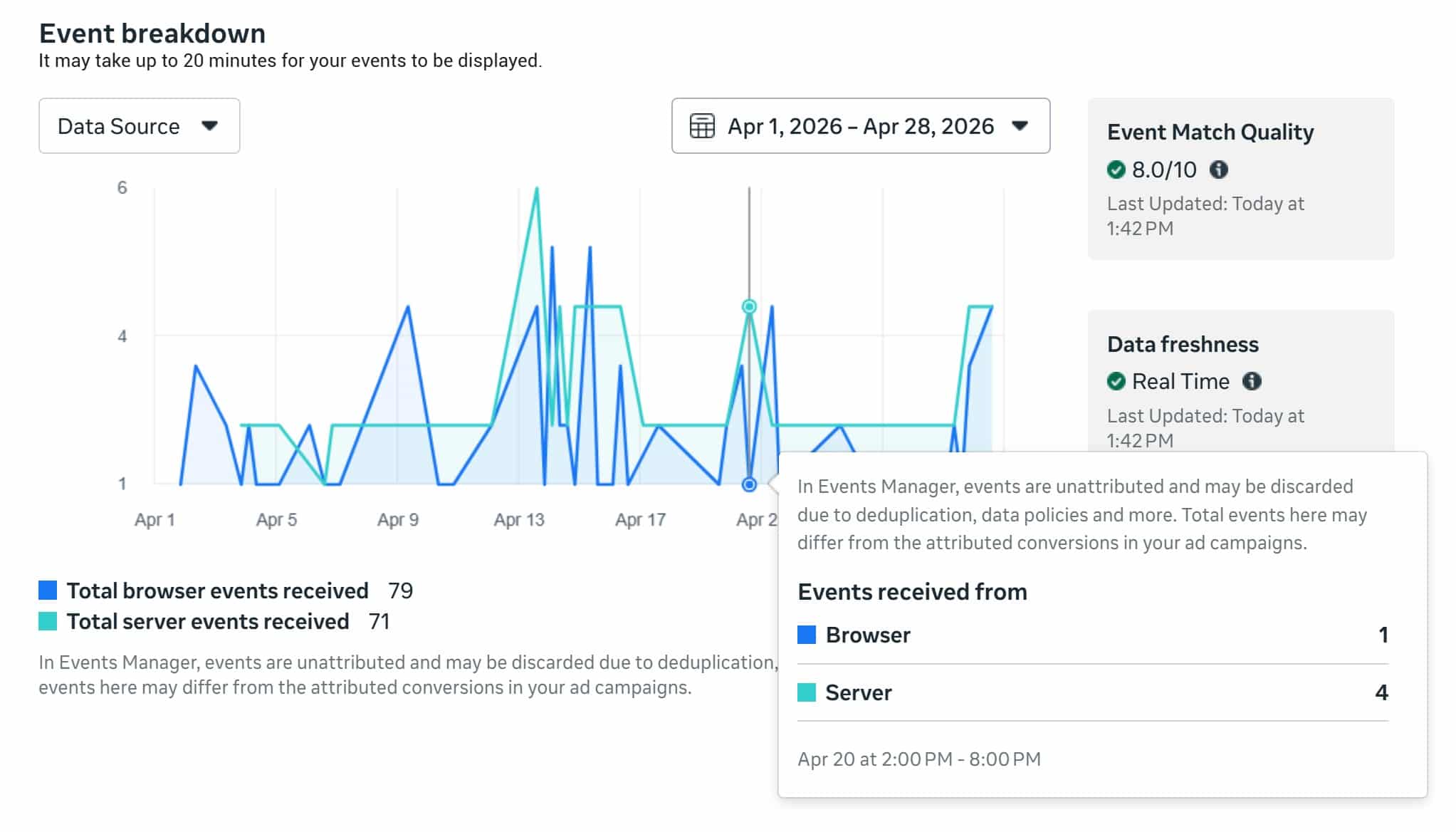
Low Event Match Quality eating your delivery. Check your EMQ score in Events Manager. Anything below 6 out of 10 means Meta is struggling to match your events to actual users. This directly affects how often your ads make it through Andromeda's retrieval stage. Poor signal quality doesn't just hurt your reporting. It actively reduces your ad delivery.
Browser-only Pixel tracking now misses 20 to 40% of conversions thanks to iOS restrictions, ad blockers, and cookie consent banners. If you haven't set up CAPI with proper deduplication, you're flying blind.
How to Fix Conversion Reporting
Open Events Manager right now. Install the Meta Pixel Helper Chrome extension. Browse your site and watch what fires. Check for duplicates, wrong triggers, and missing events. Then verify your CAPI setup has event_id deduplication enabled. This isn't optional in 2026. It's the foundation everything else sits on.
Andromeda Killed Your Targeting Strategy
If you're still running 8 ad sets with different interest stacks, each with a $15/day budget, I need you to hear this: that strategy died in 2025.
Meta's Andromeda update fundamentally changed how ads get delivered. The old system started with YOUR audience selections and then found people within them. Andromeda works in reverse. It starts with YOUR CREATIVE, reads it using computer vision and AI audio analysis, and then decides which users across Meta's entire 3 billion user base are the best match.
Your interest targeting? It's mostly a suggestion now. Advantage+ Detailed Targeting can't even be turned off for most performance goals. Meta uses your inputs as "hints" but goes wherever the algorithm thinks it'll find conversions.
This means two things for experienced buyers:
First, audience fragmentation is now a liability.
Splitting your budget across 5 to 8 narrowly targeted ad sets doesn't give the algorithm enough data per ad set to learn. You end up with everything stuck in "Learning Limited." The Confect Andromeda Study (covering 3,014 e-commerce advertisers and 115.7 billion impressions over the full 2025 calendar year) found that consolidated structures with broader targeting consistently outperform fragmented setups.
Second, your creative IS your targeting now.
An ad about "exhausted moms" will find exhausted moms regardless of your audience settings. An ad about "best SUV deals" will find SUV shoppers. The specificity lives in the creative, not in the audience panel. If your creative is generic ("Buy Now! Great Deals!"), Andromeda can't figure out who to show it to, so it shows it to low-quality traffic and your CPA goes through the roof.
I went deep on this in our article about how Andromeda affects your ad strategy. If you haven't read it yet, do that after this one.
Your Campaign Structure Is Starving the Algorithm
Here's a quick math problem that will tell you if this is your issue.
Take your daily budget. Divide by your average CPA. Multiply by 7.
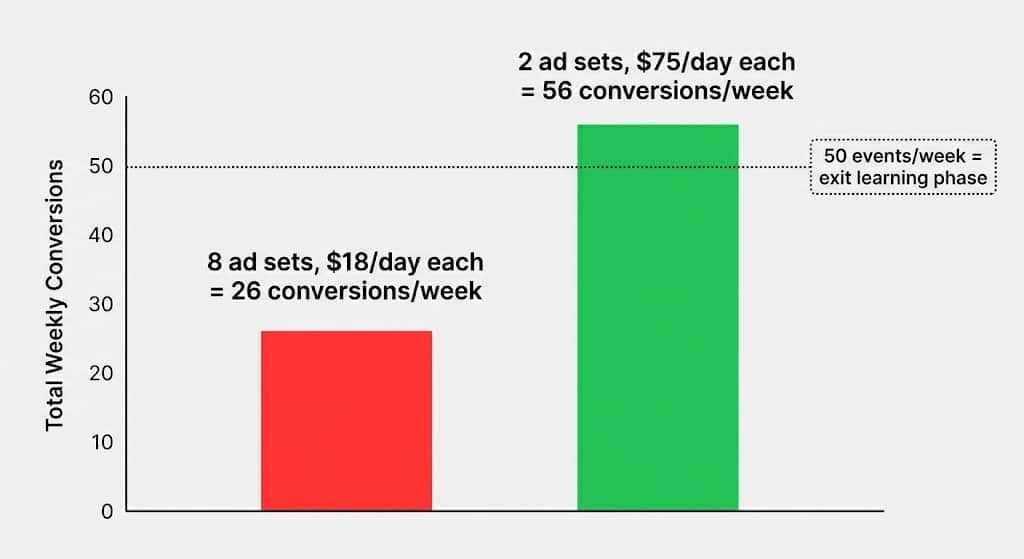
If the answer is below 50, you're starving the algorithm. Meta needs roughly 50 optimization events per week per ad set to exit learning phase. Below that, it never stabilizes, and you're stuck in a permanent loop of erratic performance.
Example: $150/day budget, $40 CPA. That's 3.75 conversions/day, or about 26 per week. Not enough. You need to either consolidate (fewer ad sets, bigger budget each) or optimize for a higher-funnel event that generates more volume.
The 2026 consensus from practitioners like Jodie Minto is pretty clear: the best-performing accounts now run 1 to 3 campaigns. One for testing new creatives (ABO with equal budgets per ad set). One for scaling proven winners (CBO with broad targeting). Maybe one for retargeting. That's it.
If you're not sure which structure to use, our campaign structure best practices guide breaks down both options with specific examples.
You're Editing Campaigns Like It's 2022
I get it. Your CPA spiked on day 2 and you panicked. You lowered the budget. Changed the targeting. Swapped a creative. Maybe all three.
Congratulations, you just reset the learning phase. Again.
Every significant edit triggers a reset. Budget changes over 20% (in general). Bid strategy swaps. New creatives added to an existing ad set. Targeting modifications. Each one restarts the clock and the algorithm has to relearn everything from scratch.
The Cometly analysis documents this well: if you've been tweaking settings every other day, you're essentially restarting the learning process each time. The algorithm never gets enough stable data to optimize.
And here's the part experienced buyers miss: the edit doesn't need to be big to cause damage. Meta's own documentation considers anything above a 20% budget change as "significant." Going from $100 to $125? That's 25%. You just triggered a reset.
What actually works:
Let campaigns run for 5-7 days minimum before touching them. If you need to adjust budgets, keep changes under 20%. Time them at the beginning of the day in your ad account's time zone so Meta starts fresh with the new number.I wrote a whole piece on why killing campaigns too early hurts performance because I kept seeing buyers murder campaigns that would have been profitable by day 5 if they'd just waited.
Your Creative Library Has Zero Diversity
You uploaded 20 ads but Meta treats them as 3.
This is the Entity ID problem, and it's the thing most buyers still don't understand about Andromeda. Meta assigns each creative an internal identifier (Entity ID) based on its visual pattern. If your 20 ads all use the same template, same background, same creator, Andromeda groups them under one Entity ID. In its eyes, you have one ad, not twenty.
That means one ticket to the retrieval auction. If that ticket fails, the other 19 never get seen. Your budget wasted on volume that the algorithm treated as duplication.
Data from admetrics.io shows Creative Similarity Scores above 60% trigger retrieval suppression. A controlled test by Five Nine Strategy found that one ad set with 25 genuinely diverse creatives outperformed 5 ad sets with 5 similar creatives each by 17% on conversions at 16% lower cost.
The fix isn't making more ads. It's making more different ads. Different angles, different formats (static, UGC video, carousel, founder-led, meme), different emotional triggers. Each one should pass a simple test: if I showed these two ads side by side, would a stranger immediately see they're different concepts?
Our guide on creating 10 different angles for the same offer gives you a framework for generating the kind of diversity Andromeda actually rewards.
Nobody Is Watching the Store at 2 AM
You log off at 6 PM on a Friday. A campaign that was profitable starts bleeding at 8 PM. By Monday morning, it's burned through $400 on traffic that wasn't converting. You would have paused it 10 minutes after the bleed started if you'd been watching. But you weren't watching.
Or the opposite. A campaign starts performing exceptionally well on Saturday afternoon. By the time you notice on Monday, the window has narrowed. You could have scaled it Saturday night and captured 2 days of peak performance. But nobody was there to pull the trigger.
Manual management has a ceiling, and that ceiling is your availability. You can't check campaigns every 10 minutes, 24 hours a day, 7 days a week. But automation rules can.
Stop-loss: Pause ad sets that spend 1.5 to 2x target CPA with zero conversions. Every 20 minutes.
Trend detection: Flag campaigns where CPA increased 50%+ over the last 2 days compared to the previous 4 days. Every 30 minutes.
Budget scaling: Increase budgets by 20 to 30% on campaigns with stable ROI over 3+ days. Twice a week, at the start of the day.
Fatigue detection: Pause ads where CTR dropped 30%+ from their 14-day average and frequency exceeded 3. Every 15 minutes.
Cloning: Duplicate winning campaigns for horizontal scaling. Once a week at 1 AM in the ad account's time zone.
I detailed the exact rules I use in our guide on 8 automation rules for scaling Meta Ads safely, including the specific thresholds and time intervals.
TheOptimizer runs all of these simultaneously across all your ad accounts. It uses 100+ metrics including data from external trackers like Voluum, RedTrack, and Binom. So you're not just optimizing on what Meta reports. You're optimizing on what actually happened.
One of our users, Ara from Ten Digital, automated about 90% of his campaign management within the first month. His CPA dropped 20%. Not because the automation was smarter than him. Because the automation was always there. Checking every 10 minutes. Not just when he remembered to.
Your Funnel Is the Bottleneck, Not Your Ads
Sometimes your ads are doing their job fine. The CTR is solid. People are clicking. They're arriving at your landing page.
And then nothing happens.
I see this a lot with experienced buyers who obsess over ad metrics but never look at what happens after the click. A 2.5% CTR means nothing if your landing page converts at 0.8%.
Check these in order:
- Landing Page View Rate. What percentage of clicks actually result in a page load? If it's below 70%, your page is too slow. Test on mobile specifically since 70%+ of Meta traffic is mobile.
- On-page conversion rate. If you're below 2% for e-commerce or below 10% for lead gen, the problem is the page, not the ad.
- Lead quality downstream. Are the leads that come through actually closing? If your CPL looks great but your sales team says the leads are junk, you might be optimizing for the wrong event or your form isn't qualifying well enough.
This isn't a Meta Ads problem. But it shows up as one because the metric you care about (revenue, closed deals, actual purchases) doesn't match what the dashboard says.
Meta Ads Performance Diagnostic Checklist
Instead of trying to fix everything at once, work through this in order. Each step builds on the one before it.
Fix them in order. Don't jump to #5 if #1 is still broken.
FAQ
My dashboard shows conversions but my CRM doesn't match. What's going on?
Almost always a tracking issue. Either Pixel + CAPI double-counting without deduplication, admin traffic hitting conversion pages, or events firing at the wrong stage. Cross-reference Meta's reported conversions against your CRM data for 7+ days to quantify the gap. Then fix the tracking setup before making any optimization decisions.
My ads were working great and suddenly tanked. Nothing changed on my end.
Two things to check. First, look at your edit history. Even small changes (budget adjustments over 20%) trigger learning phase resets. Second, check if Meta changed something on their end. The March 2026 attribution rebuild split click-through into "click-through" (link clicks only) and "engage-through" (other interactions). Add the engage-through column to your dashboard. Your performance may not have changed; the reporting did.
How much budget do I actually need for Meta Ads to work?
It depends entirely on your CPA. Your daily budget should be at least 10x your target CPA per ad set. If you're targeting a $30 CPA, you need $300/day minimum for that ad set. Below that, you won't hit the 50 events/week threshold and you'll be stuck in learning limited forever.
Should I use Advantage+ Shopping or manual campaigns?
Both work. At $300+/day with a product catalog, ASC tends to outperform because it gives the algorithm maximum flexibility. Below that, or for non-ecommerce campaigns, a manual CBO with broad targeting works just as well. Some buyers run both: ASC as primary, manual campaign as a creative testing sandbox.
How often should I be refreshing creatives in 2026?
Faster than you think. Under Andromeda, creative fatigue windows have shrunk from 6+ weeks to 2 to 3 weeks. Plan to introduce 2 to 4 genuinely new creative concepts per week if you're spending $200+/day. At $1,000+/day, that number goes up to 4 to 8 per week.