
Adskeeper is a native advertising network with a broad publisher base across Europe and international markets. It is used by performance marketers running native campaigns for e-commerce, finance, and health verticals who want access to traffic sources outside the major tier-one networks. Adskeeper connects via API credentials — you copy an API Key from your Adskeeper account settings and paste it into TheOptimizer.Documentation Index
Fetch the complete documentation index at: https://theoptimizer.io/docs/llms.txt
Use this file to discover all available pages before exploring further.
Where to Find Your API Credentials
Log in to the Adskeeper platform → go to Account settings → API → copy your API Key.Connecting to TheOptimizer
Open the Integrations page
From the left-hand menu, go to Integrations. Find the Adskeeper card and click Connect →.
Enter Your API Credentials
Enter the credentials requested:
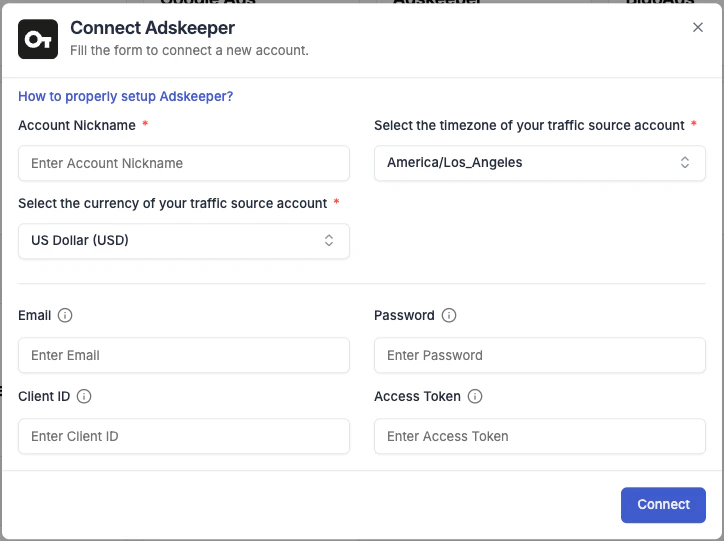
- Integration name — a descriptive label for this connection (e.g. “Adskeeper – Main Account”).
- API Key — paste the API Key from your Adskeeper account settings.

Next Steps
- Connect a tracking platform to bring conversion and revenue data into your campaign reports
