
BigoAds is the advertising platform of Bigo Technology, offering access to large audiences across Bigo Live, Likee, and other apps in their portfolio. It is used by performance marketers targeting mobile-first audiences in Southeast Asia, the Middle East, and other emerging markets. BigoAds connects via API credentials — you copy an App ID and App Secret from your BigoAds business platform settings and paste them into TheOptimizer. These function as your Client ID and Client Secret for the API.Documentation Index
Fetch the complete documentation index at: https://theoptimizer.io/docs/llms.txt
Use this file to discover all available pages before exploring further.
Where to Find Your API Credentials
Log in to the BigoAds business platform → go to Settings → API → copy your App ID and App Secret.Connecting to TheOptimizer
Open the Integrations page
From the left-hand menu, go to Integrations. Find the BigoAds card and click Connect →.
Enter Your API Credentials
Enter the credentials requested: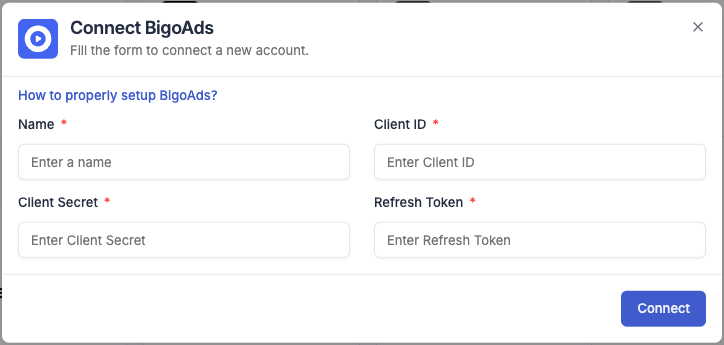
- Integration name — a descriptive label for this connection (e.g. “BigoAds – Main Account”).
- App ID — paste the App ID from your BigoAds settings (this is your Client ID).
- App Secret — paste the App Secret from your BigoAds settings (this is your Client Secret).
Next Steps
- Connect a tracking platform to bring conversion and revenue data into your campaign reports