
Documentation Index

Fetch the complete documentation index at: https://theoptimizer.io/docs/llms.txt

Use this file to discover all available pages before exploring further.

MediaGo is a programmatic native advertising platform operated by Baidu, with strong reach across premium Japanese and Asian publisher networks. It is used by performance marketers targeting audiences in Japan and broader Asia-Pacific markets with native display campaigns. MediaGo connects via API credentials — you copy an API Key from your MediaGo account settings and paste it into TheOptimizer.

Where to Find Your API Credentials

Log in to the MediaGo platform → go to Account settingsAPI → copy your API Key.

Connecting to TheOptimizer

1

Open the Integrations page

From the left-hand menu, go to Integrations. Find the MediaGo card and click Connect →.
2

Enter Your API Credentials

Enter the credentials requested:
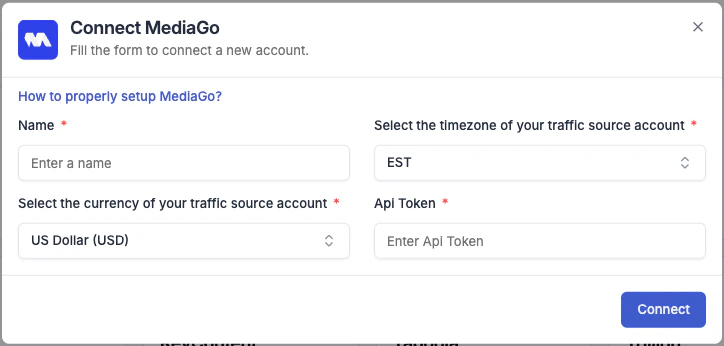
  • Integration name — a descriptive label for this connection (e.g. “MediaGo – Main Account”).
  • API Key — paste the API Key from your MediaGo account settings.
Give the integration a descriptive name so it’s easy to identify if you manage multiple accounts.
MediaGo connection form in TheOptimizer
3

Connection confirmed

Once credentials are accepted, TheOptimizer begins syncing your campaign data. Initial sync takes up to 20–30 minutes.
If you have multiple ad accounts under this network, they will all be pulled in and listed under this integration after the initial sync.

Next Steps

  • Connect a tracking platform to bring conversion and revenue data into your campaign reports