
Assertive Yield connects using your account email and password, not an API key. Make sure you use the credentials for the Assertive Yield account that owns the properties you want to track.
Connecting to TheOptimizer
Open Integrations
From the left-hand menu, go to Integrations. Scroll to the Tracking Platforms section, find the Assertive Yield card and click Connect →.
Enter Your Account Credentials
Fill in the connection form: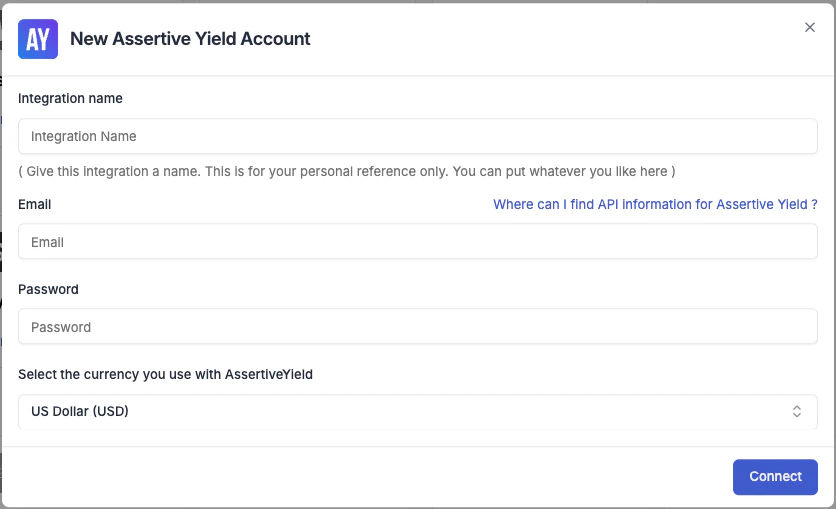
- Integration name — a label for this connection (e.g. “Assertive Yield – Main”).
- Email — the email address you use to log in to Assertive Yield.
- Password — the password for your Assertive Yield account.
Add an Assertive Yield Entity
After saving your credentials, TheOptimizer prompts you to add an Assertive Yield Entity. An entity represents a web property tracked in Assertive Yield (e.g. a website or domain).Click Add Assertive Yield Entity and configure the tracking token mapping. This tells TheOptimizer how to match revenue data from Assertive Yield to your campaigns.TheOptimizer supports passing all required tracking values through a single UTM parameter, so existing UTM configurations can be kept as-is while still correctly matching traffic source and Assertive Yield data.
If you track multiple web properties in Assertive Yield, add a separate entity for each one.
What Data Assertive Yield Brings In
Once connected, TheOptimizer pulls publisher revenue metrics from Assertive Yield into your campaign reports. These include:- Revenue (total, Prebid, Direct, Dynamic Allocation)
- RPM and Session RPM variants
- Impressions, Sessions, Page Views
- Viewability and Value-RPM metrics