Automation rules are powerful on their own, but individually they only react to a single moment in time. Rule chains let you build sequences of rules that execute in a deliberate order — each rule picking up exactly where the previous one left off. The mechanism that makes this possible is tags: structured labels you attach to campaigns, ad sets, ads, or sites that carry history forward from one rule to the next.
How rule chains work
Every rule in TheOptimizer can be configured to add or remove tags from the items it acts on. Those tags then become available as conditions in other rules, so you can create logic like: “Only run this rule on campaigns that have already been processed by that other rule.”
This creates a pipeline: Rule A fires and tags the item, and Rule B is waiting for exactly that tag before it acts.
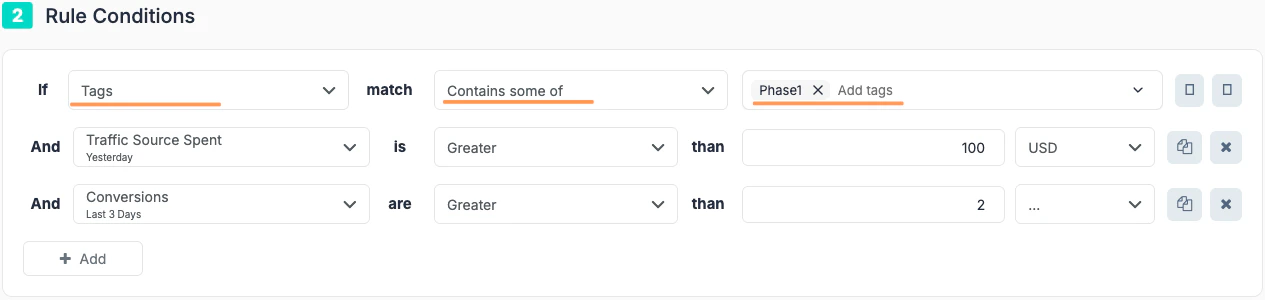
Example: Rule checks for tags using the “Tags” condition.
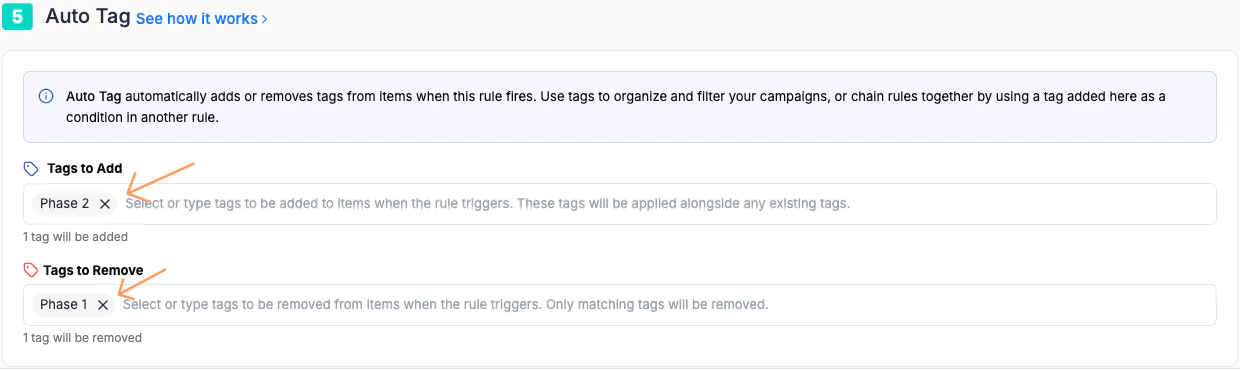
Example: Rule Adds and/or Removes Tags once it finishes the execution. It prepares the campaign, ad set or ad for the next stage.
The key principle: a tag is a signal that something has already happened. It carries history forward.
When editing any rule, navigate to the Auto Tags section.
- Tags to Add — one or more tags applied to every item the rule acts on when it fires.
- Tags to Remove — tags stripped from items when the rule fires (useful for clearing a stage so an item can move to the next one).
Tags are applied immediately after the rule’s main action executes. If a rule pauses a campaign, the tags are added or removed from that campaign at the same time.
To use a tag as a condition in another rule, add a condition in Step 2 (Conditions) using the Tags field:
| Field | Condition | Value |
|---|
| Tags | Contains | your-tag-name |
Use descriptive, stage-based tag names rather than rule-based ones. passed-learning or budget-scaled-once are far more readable at a glance than rule3-fired. Name the stage, not the rule.
Example chains
1. The Probation Chain — pause, wait, re-test
Goal: Pause campaigns that lose money, hold them for a cooling-off period, then automatically reactivate them for a second chance before deciding whether to kill them permanently.
Why chain this? A direct pause-and-forget rule loses campaigns that may have had a bad day. This chain distinguishes between temporary underperformers and genuine losers.
Rule 1 — Stop-loss with tagging
Fires when a campaign has spent enough to judge performance and is not profitable.| Metric | Condition | Value |
|---|
| Spend | Greater than | $50 |
| CPA | Greater than | $40 |
on-probationSchedule: Every 4 hours Rule 2 — Reactivate after cooling-off
Fires on campaigns tagged on-probation that have been paused for at least 3 days.| Metric | Condition | Value |
|---|
| Tags | Contains | on-probation |
| Days Since Last Action | Greater than | 3 |
retest-round-2 | Tags to Remove: on-probationSchedule: Once daily Rule 3 — Final verdict
Fires on campaigns tagged retest-round-2 that are still unprofitable after their second chance.| Metric | Condition | Value |
|---|
| Tags | Contains | retest-round-2 |
| Spend | Greater than | $30 |
| CPA | Greater than | $40 |
permanent-pause | Tags to Remove: retest-round-2Schedule: Every 4 hoursItems tagged permanent-pause are excluded from all other rules — preventing them from being re-enabled by broader reactivation rules. Add a condition Tags does not contain permanent-pause to any reactivation rule you run.
2. The Winner Escalation Chain — validate, scale, clone
Goal: Automatically move profitable campaigns through a structured scaling process — only unlocking larger budget increases and cloning after sustained performance, not just one good day.
Why chain this? Scaling too fast on early signals wastes budget on campaigns that regress. This chain requires proof at each stage before moving to the next.
Rule 1 — Flag potential winners
Fires when a campaign shows early profitability signals.| Metric | Condition | Value |
|---|
| ROAS | Greater than | 200% |
| Spend | Greater than | $100 |
potential-winnerSchedule: Every 6 hours Rule 2 — Confirm and scale budget (Stage 1)
Fires on campaigns tagged potential-winner that maintain profitability over 3 days.| Metric | Condition | Value |
|---|
| Tags | Contains | potential-winner |
| ROAS (last 3 days) | Greater than | 200% |
| Spend (last 3 days) | Greater than | $200 |
scale-stage-1 | Tags to Remove: potential-winnerSchedule: Once daily Rule 3 — Scale to full speed (Stage 2)
Fires on campaigns tagged scale-stage-1 that are still performing after further spend.| Metric | Condition | Value |
|---|
| Tags | Contains | scale-stage-1 |
| ROAS (last 7 days) | Greater than | 180% |
| Spend (last 7 days) | Greater than | $500 |
scale-stage-2 | Tags to Remove: scale-stage-1Schedule: Once daily Rule 4 — Clone the winner
Fires on campaigns tagged scale-stage-2 with sustained, strong ROAS — duplicating the campaign to expand reach.| Metric | Condition | Value |
|---|
| Tags | Contains | scale-stage-2 |
| ROAS (last 14 days) | Greater than | 180% |
cloned | Tags to Remove: scale-stage-2Schedule: Once daily
3. The Creative Fatigue Chain — detect, rotate, retire
Goal: Automatically detect when an ad’s performance is fading, pause it for a rest period, then reactivate it. If performance doesn’t recover, retire it permanently.
Why chain this? Creative fatigue is gradual. A single threshold rule either acts too early or too late. This chain catches the decline in stages.
Rule 1 — Flag fading creatives
Fires on ads that have been running long enough to have a performance baseline but are showing CTR decline.| Metric | Condition | Value |
|---|
| Impressions | Greater than | 50,000 |
| CTR | Less than | 0.10% |
| Conversions | Less than | 3 |
creative-fatigueSchedule: Every 6 hours Rule 2 — Pause fatigued creatives
Fires on ads tagged creative-fatigue if CTR has not recovered after 48 hours.| Metric | Condition | Value |
|---|
| Tags | Contains | creative-fatigue |
| CTR (last 2 days) | Less than | 0.10% |
creative-resting | Tags to Remove: creative-fatigueSchedule: Every 6 hours Rule 3 — Reactivate for re-test
Fires on paused ads tagged creative-resting after 7 days, giving them a fresh start.| Metric | Condition | Value |
|---|
| Tags | Contains | creative-resting |
| Days Since Last Action | Greater than | 7 |
creative-retest | Tags to Remove: creative-restingSchedule: Once daily Rule 4 — Retire if still underperforming
Fires on ads tagged creative-retest that still aren’t converting after their second chance.| Metric | Condition | Value |
|---|
| Tags | Contains | creative-retest |
| Impressions (last 3 days) | Greater than | 10,000 |
| CTR (last 3 days) | Less than | 0.10% |
creative-retired | Tags to Remove: creative-retestSchedule: Every 6 hours
Tips for building reliable chains
Keep each rule’s job narrow. A rule in a chain should do one thing — flag, scale, pause, or reactivate. Rules that try to handle multiple stages get hard to debug and maintain.
Use Tags to Remove to prevent re-entry. If Rule 2 fires on a tag left in place, it may fire again on the same item on the next run. Always remove the inbound tag once the rule has acted.
Add a notification at key transitions. For high-stakes stages — especially scaling or cloning — enable notifications alongside the tag action so you stay informed while the chain runs autonomously.
Test with small scope first. Before applying a chain globally, add it to a small group of campaigns using the standard (non-global) rule type. Review the tag history on those campaigns after the first few runs to confirm the flow is working as intended.
Use permanent-pause or retired tags as circuit breakers. Add a condition Tags does not contain permanent-pause to any reactivation rule to ensure items that have been deliberately stopped never get re-enabled by a separate rule.