
Where to Find Your API Key
Log in to your Binom installation → go to Admin panel → Settings → API → copy the API Key shown. Because Binom is self-hosted, you will also need the domain URL of your Binom installation when connecting in TheOptimizer.Connecting to TheOptimizer
Open Integrations
From the left-hand menu, go to Integrations. Scroll to the Tracking Platforms section, find the Binom card and click Connect →.
Enter Your API Credentials
Fill in the connection form: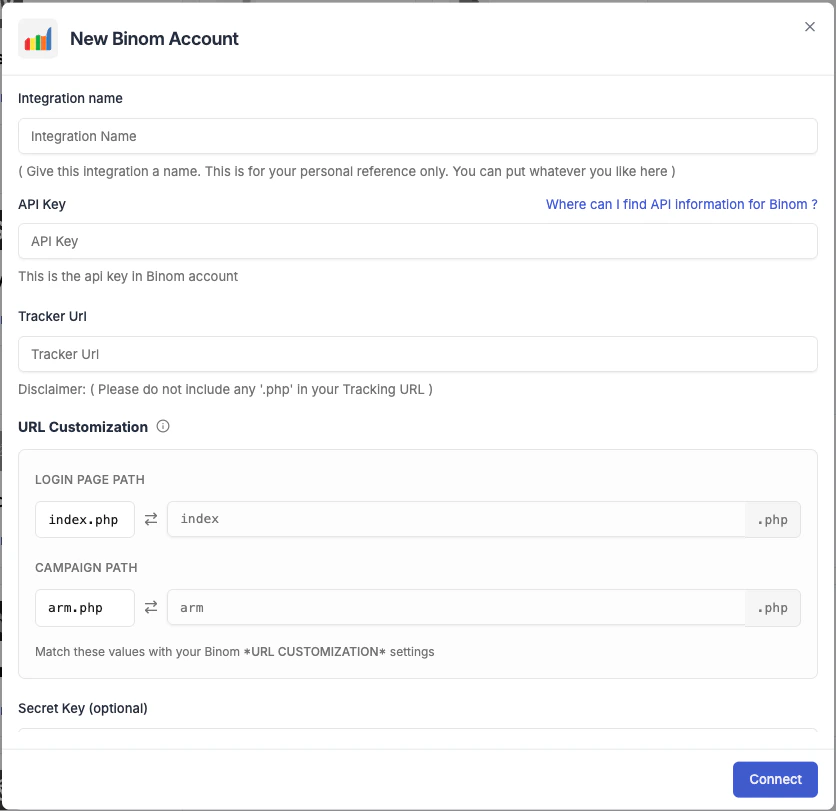
- Integration name — a label for this connection (e.g. “Binom – Brand A”).
- API Key — paste the key you copied from Binom.
- Tracker URL — the domain of your Binom installation (e.g.
https://tracker.yourdomain.com). Do not include.phpat the end of the URL. - Currency — the currency your tracker reports revenue in. Must match your tracker’s settings.
- Conversion registration time — choose Visit time (conversion counted when user lands) or Postback time (counted when conversion fires). Match this to your tracker’s setup.
- Secret Key (optional) — if you have configured a secret key in Binom for additional API security, enter it here.
- Login Page Path — the path to your Binom login page (default:
login). - Campaign Path — the path used for campaign tracking links (default:
click).
Configure for Your Ad Networks
After saving the credentials, TheOptimizer prompts you to configure the tracker for each connected ad network. This step tells the platform how to match Binom data to your campaigns.Click Configure → next to each ad network and select the tracking template that matches how you set up Binom for that network.Understanding tracking templatesA tracking template is a set of macros that maps your tracker’s URL parameters to ad network identifiers (Campaign ID, Ad Set ID, Ad ID, Placement). The dropdown shows all templates available from your Binom account. Select the one you use for that ad network.Once a template is selected, the connection status for that ad network updates to Connected.
Ad networks where you have not selected a tracking template will not receive any data from Binom. Configure every network you actively use.
Add Tracking Parameters to Your Campaigns
TheOptimizer generates a tracking parameters code at the end of setup. Add this URL parameter string to your campaigns on each ad network. This is what allows Binom to receive the correct campaign and ad identifiers and report them back.Without this step, Binom will receive visits but won’t be able to match them to specific campaigns — no conversion or revenue data will appear in TheOptimizer.