
If your strategy involves testing the same campaigns across multiple Facebook ad accounts — to diversify delivery, take advantage of the learning phase independently per account, or reduce Facebook’s initial randomness — the Campaign Creator supports this natively.Documentation Index
Fetch the complete documentation index at: https://theoptimizer.io/docs/llms.txt
Use this file to discover all available pages before exploring further.
Build your full campaign structure
Complete your campaign configuration, including any groups, Restructuring settings, and other options.
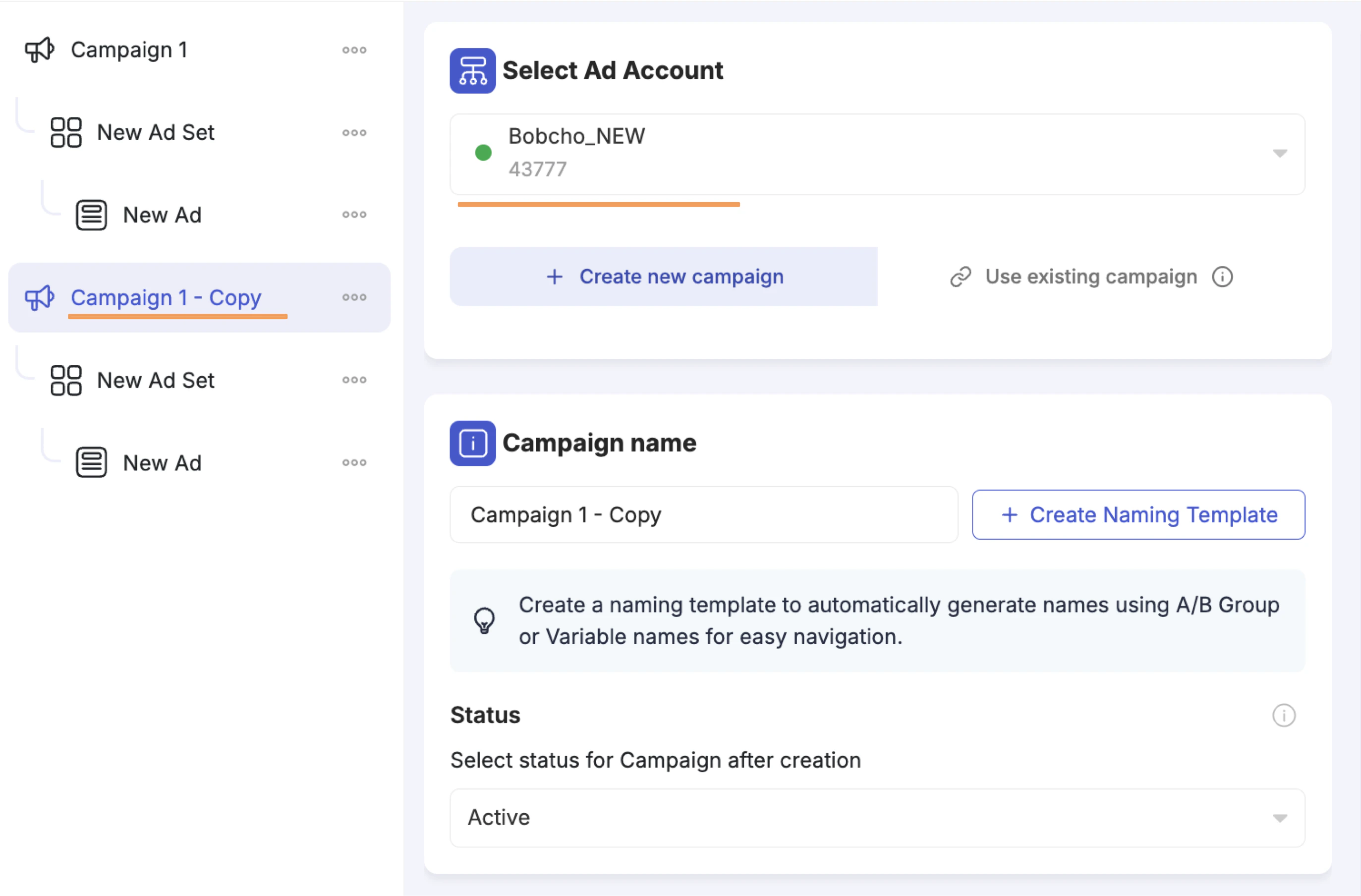
Duplicate the top-level campaign
In the left panel, click the three-dot menu (⋯) on the top-level campaign and click Duplicate. This creates an exact copy of the entire structure — campaign, ad sets, ads, all variation groups, and Restructuring settings.
Change the Ad Account on the duplicated copy
Click the duplicated campaign and change the Ad Account to the new account you want to launch in.
Update account-specific fields if needed
If the new account uses different Facebook Pages, Instagram Accounts, or Pixels, navigate to the ad set and ad levels to update those fields.
Repeat for additional accounts
Repeat the duplication and account-change steps for as many ad accounts as needed.
If your Facebook Pages, Instagram Accounts, and Pixels are shared across ad accounts, you typically only need to change the ad account selection — everything else carries over automatically.