Optimize with Real Business Data

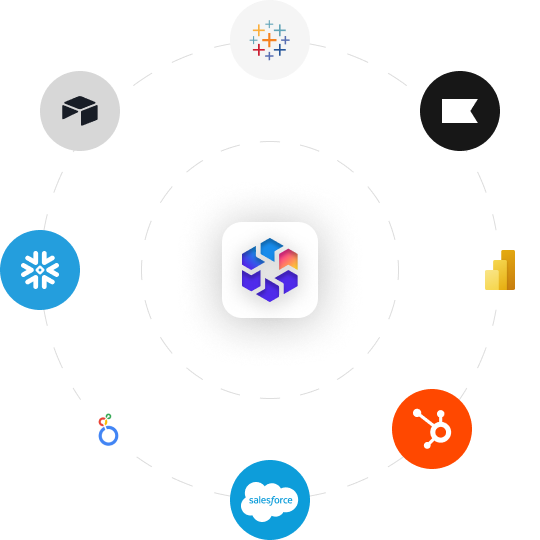
Ad platforms only see part of the story. Bring data from Airtable, Snowflake, Tableau, Looker Studio, BigQuery, Klaviyo, Power BI, Segment, Mixpanel, HubSpot, Salesforce, and other systems into TheOptimizer so you can report, analyze, and automate based on the outcomes that matter most.
7-day free trial
No credit card required
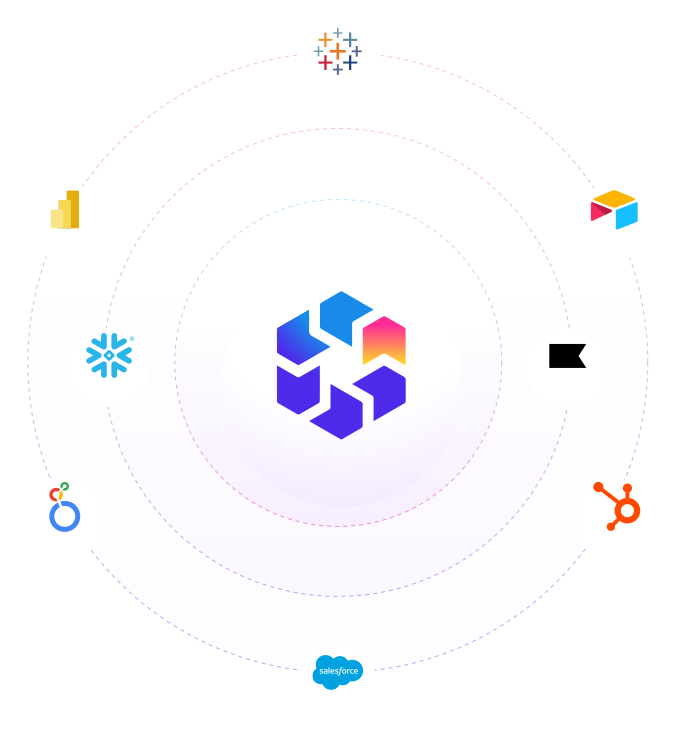
TheOptimizer logo at the center of an orbit diagram connecting external data tools including Tableau, Airtable, Snowflake, Power BI, Looker Studio, HubSpot, and Salesforce, representing the Custom API integration that brings any business data source into TheOptimizer

Use Real Outcomes to Drive Better Optimization

Ad networks report leads, conversions, or purchases. Your real business outcomes live somewhere else. Sold or qualified leads, booked calls, approved applications, subscriptions, refunds, margin, pipeline value, and customer revenue often sit inside tools your team already uses every day.

CRM and Sales systems

HubSpot, Salesforce, and other sales systems can bring in deal status, sold leads, pipeline value, qualified leads, closed revenue, and sales outcomes.
Data flow diagram showing HubSpot, Salesforce, and other sales systems connecting to TheOptimizer and outputting five data types: Deal Status, Pipeline Value, Sold Leads, Closed Revenue, and Qualified Leads

BI and Reporting tools

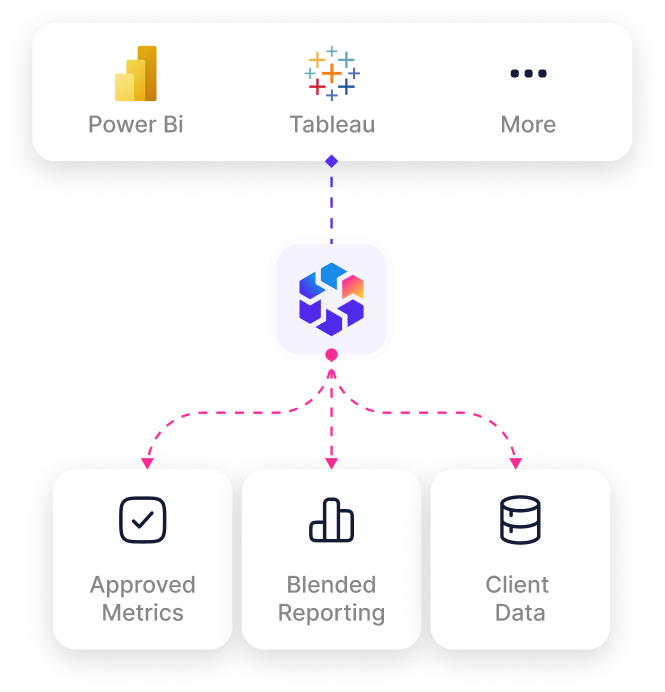
Tableau, Looker Studio, Power BI, and internal dashboards can bring in approved metrics, blended reporting, client data, and performance views your team already trusts.
Data flow diagram showing Power BI, Tableau, and other BI tools connecting to TheOptimizer and outputting three data types: Approved Metrics, Blended Reporting, and Client Data

Data Warehouses and DBs

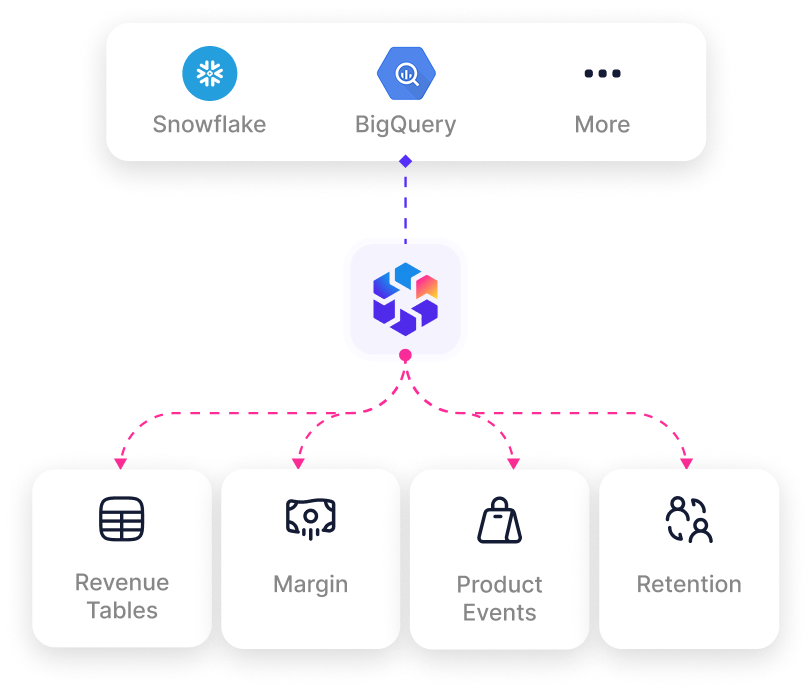
Snowflake, BigQuery, and similar systems can bring in cleaned business data, revenue tables, product events, margin, retention, and deeper funnel outcomes.
Data flow diagram showing Snowflake, BigQuery, and other data warehouses connecting to TheOptimizer and outputting four data types: Revenue Tables, Margin, Product Events, and Retention

Customer and event platforms

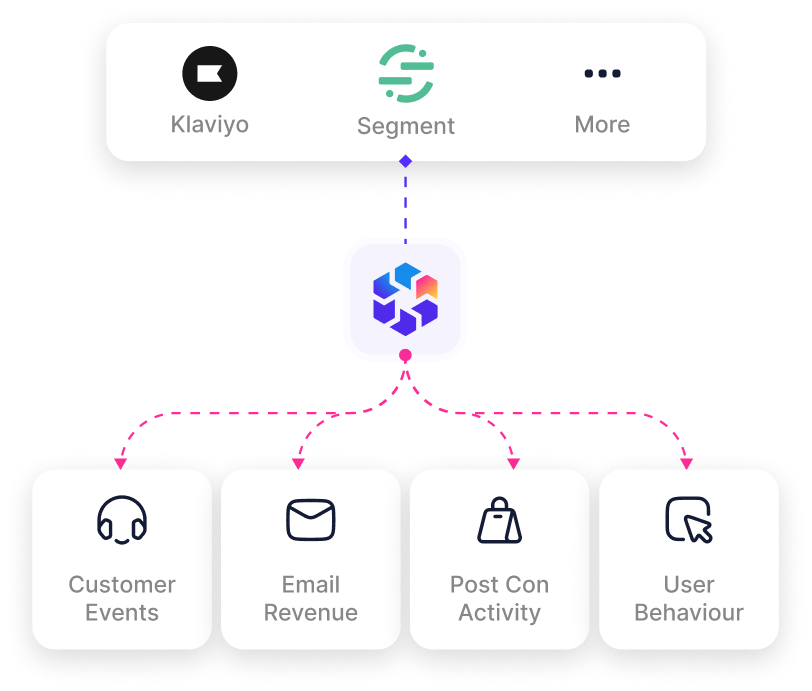
Klaviyo, Segment, Mixpanel, and other platforms can bring in customer events, subscriptions, retention, email revenue, user behavior, and post-conversion activity.
Data flow diagram showing Klaviyo, Segment, and other customer platforms connecting to TheOptimizer and outputting four data types: Customer Events, Email Revenue, Post Conversion Activity, and User Behaviour

Drive Optimization Actions With Better Context

Spot Data Discrepancies

Compare what the ad network reports against your internal source of truth. See when Meta, Google, TikTok, Taboola, Outbrain, or any other network is undercounting or overcounting the outcomes your team cares about.
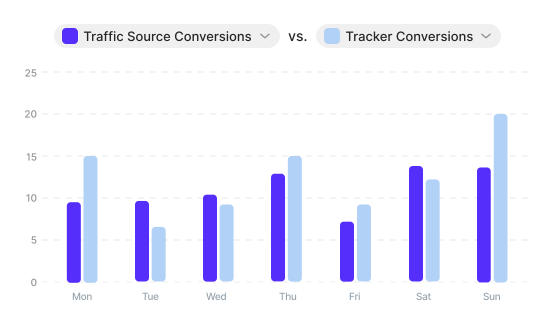
Bar chart comparing Traffic Source Conversions versus Tracker Conversions by day of week from Monday to Sunday, showing how TheOptimizer surfaces the gap between what ad networks like Meta, Google, TikTok, Taboola, and Outbrain report and what your internal data records

Optimize Toward Sold Leads

Move beyond raw lead counts. Bring in sold leads, qualified leads, booked calls, approved applications, or any downstream status so media buyers can optimize toward the leads that actually create value.
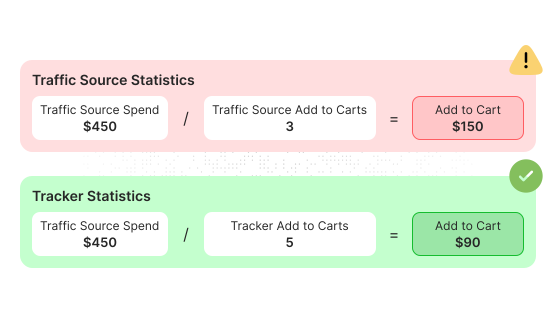
Two-panel comparison showing Traffic Source Statistics with Traffic Source Spend of $450 divided by 3 Add to Carts equalling an Add to Cart cost of $150 flagged with a warning indicator, versus Tracker Statistics below showing the same $450 spend divided by 5 Add to Carts equalling an accurate $90 cost confirmed with a green checkmark, illustrating the difference between platform-reported and actual sold lead cost

Measure Deeper Funnel Events

Track what happens after the first conversion. Use sales outcomes, customer actions, subscriptions, revenue, payout, retention, lead quality, or funnel stage data to guide better decisions.
Funnel flow diagram showing the three-step campaign path from Ad to Landing Page to Offer with dashed arrows between each stage, representing post-conversion funnel tracking using Custom API data such as sales outcomes, subscriptions, revenue, payout, and retention

Improve AI Campaign Analysis

Ask AI to compare platform reported conversions with your internal data, find campaigns with poor lead quality, explain performance differences, and surface the accounts, ads, or ad sets that need attention.
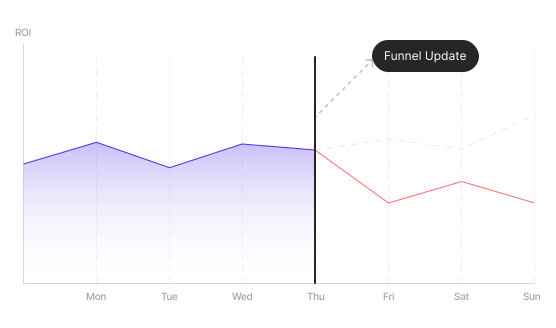
ROI line chart showing campaign performance trend across Monday to Sunday with a Funnel Update event marker on Thursday, illustrating how importing internal business data via Custom API allows AI to detect the point where a funnel change caused ROI to diverge from baseline

Automate Based on Real Outcomes

Create rules and alerts using the metrics that matter to your business. Pause waste, tag campaigns, control budgets, flag quality drops, or alert your team when deeper funnel performance changes.
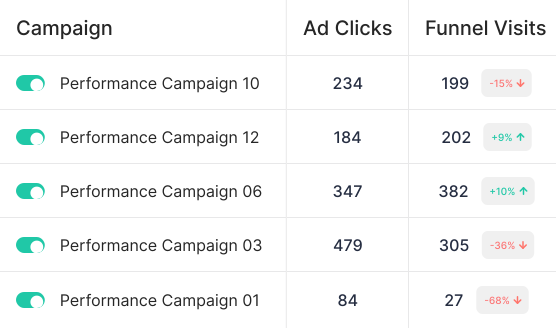
Campaign automation table in TheOptimizer showing five campaigns with Ad Clicks and Funnel Visits columns. Performance Campaign 10 shows 234 clicks and 199 funnel visits at minus 15 percent, Campaign 12 shows 184 clicks and 202 visits at plus 9 percent, Campaign 06 shows 347 clicks and 382 visits at plus 10 percent, Campaign 03 shows 479 clicks and 305 visits at minus 36 percent, and Campaign 01 shows 84 clicks and 27 visits at minus 68 percent, with automation rules acting on the real outcome data rather than ad platform numbers

Create Custom Calculated Metrics

Build KPIs that match your business model. Calculate sold lead CPA, qualified lead rate, revenue per lead, margin, ROI, profit, payout per click, approval rate, pipeline value, or any metric your team uses to optimize.
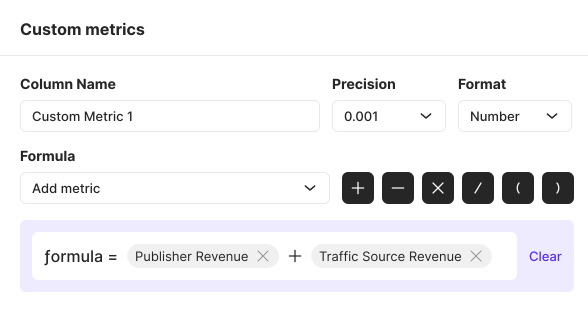
Custom metrics builder in TheOptimizer showing a formula field with Publisher Revenue plus Traffic Source Revenue tokens, Column Name set to Custom Metric 1, Precision set to 0.001, and Format set to Number, used to create business KPIs such as sold lead CPA, qualified lead rate, revenue per lead, margin, and payout per click using Custom API data
automated rules run our buys
TheOptimizer really helped us get our buys to the next level. The ability to still have control while letting automated rules run our buys has been what set TheOptimizer apart from all other API's we tested.

Joe Burton, ROI Marketplace Agency, TheOptimizer customer who uses automated rules to manage media buys
Joe Burton
ROI Marketplace - Agency
Get Started for Free
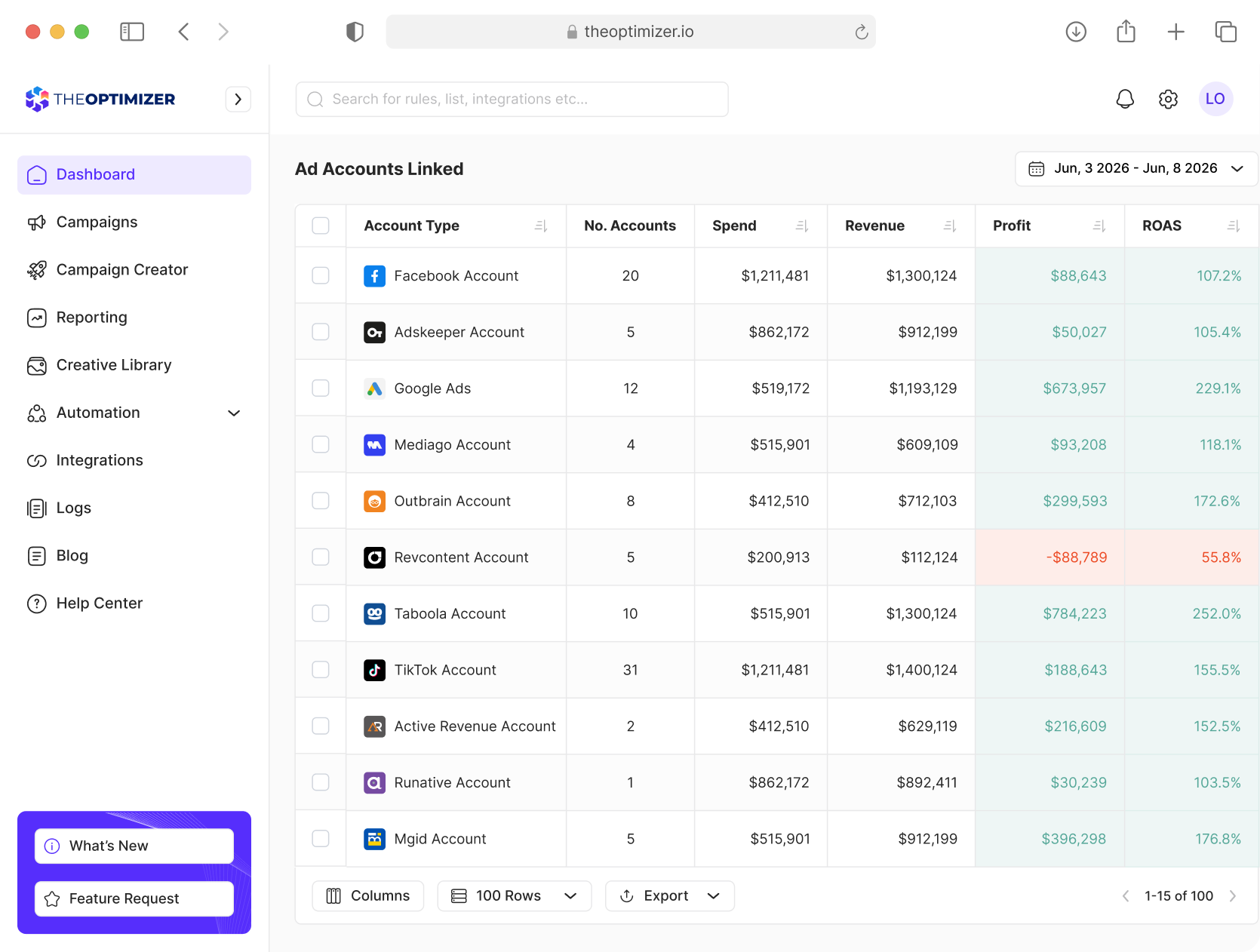
TheOptimizer campaign management dashboard interface

Analyze, Optimize, and Scale from One Dashboard

Connect your ad platforms, analytics tools, and CRM data in one place. Use AI to uncover opportunities, execute optimizations, and automate repetitive work across multiple accounts.
Ask AI to uncover opportunities, execute optimizations, and automate repetitive tasks across all your accounts.
Combine ad network, tracker, and CRM data into custom metrics to power smarter decisions and automations.
Analyze performance across different time periods to detect trends, anomalies, and emerging opportunities.
Report across hundreds of accounts, clients, and currencies from one place.
Get Started for Free
TheOptimizer unified dashboard showing linked ad accounts table with rows for Facebook Account, Adskeeper Account, Google Ads, Mediago Account, Outbrain Account, Revcontent Account, Taboola Account, TikTok Account, Active Revenue Account, Runative Account, and MGID Account, with columns for Account Type, Number of Accounts, Spend, Revenue, Profit, and ROAS