How to Bulk Upload NewsBreak Campaigns in 2026 (Using AI)

If you run NewsBreak campaigns at any kind of volume, you already know the slow part isn't the campaigns themselves. It's building them. Clicking through the ad manager one campaign, one ad set, one ad at a time. Re-entering the same targeting, the same budgets, the same bids, over and over, until an afternoon has quietly disappeared.
We just rolled out a bulk Excel campaign uploader for NewsBreak inside TheOptimizer that removes almost all of that manual work. You set up a template once, reuse it to launch entire batches of campaigns in one upload, and let AI fill in the file for you. In this guide I'll walk through exactly how it works: how to generate the template, how to use a free AI skill to build your upload file, how to launch everything at once, and how to automate the whole flow end to end with our API.
What is NewsBreak, and who advertises on it?
Before we get into the mechanics, it's worth understanding what NewsBreak actually is, because it's a different animal from the open-web native networks most media buyers started on.
NewsBreak (built by Particle Media) is the largest local news app in the United States. It pulls together content from thousands of trusted publishers, CNN, CBS, the Associated Press, NBC, and local outlets, alongside original reporting from local contributors, and personalizes each reader's feed right down to their zip code. On its advertising platform, NewsBreak reports reaching 40M+ monthly users, with the consumer side citing over 50M readers and app-store ratings of 4.7 on iOS and 4.2 on Android.
How NewsBreak differs from other native ad networks
Networks like Taboola, Outbrain, and MGID are open-web recommendation platforms: your ads show up as "around the web" widgets syndicated across thousands of third-party publisher sites. NewsBreak runs the opposite model, a single owned-and-operated app where the inventory, the audience, and the first-party data all live in one place.
Who's actually on NewsBreak
The audience is US-based and local-first: people checking their feed for neighborhood news, local events, weather, safety alerts, and community happenings. NewsBreak describes its ad business as built for one purpose, connecting brands with "hyper-engaged locals." Because the whole app is organized around local news by zip code, it offers genuinely hyperlocal geo targeting, layered with demographic (age, gender, language), interest, and contextual targeting that matches your ad to the local news people are reading.
A field-tested breakdown from ClickFlare puts a finer point on that audience: NewsBreak skews slightly older (roughly 33% Gen X and 30% Millennials), includes around 32 million homeowners, and carries a mean household income near $69,000. That's Tier-1 US traffic with real purchasing power, which is why the platform tends to perform for verticals like insurance, home improvement, finance, health and wellness, and e-commerce.
What works best on NewsBreak
Looking at NewsBreak's own published success stories, a few categories stand out as strong fits:
- E-commerce and DTC offers: DFO Global Performance Commerce reported a 10–15% lower CPA than other platforms, and online jewelry brand Bring The Love saw 24% lower customer acquisition cost.
- Local services and lead gen: real-estate agent Yuen & Co reported 13× more listing views than Realtor.com, and Kearney Realty used it for a hyperlocal grand opening.
- Local hiring: Del Taco filled roles by advertising employment locally.
- App installs: Evadav Traffic Group drove app installs at a CPI 29% under target using Target CPA bidding and iOS-specific targeting.
On formats, NewsBreak offers in-feed native, in-article, related-article, video, carousel, and newsletter placements. In-feed native, the format that looks and behaves like the news content around it, is the workhorse for most direct-response advertisers (see NewsBreak's ad specs for the details).
NewsBreak campaign best practices
Combining NewsBreak's own platform guidance with a field-tested playbook published by ClickFlare, here's what consistently works:
- Track with a pixel and postbacks. Install the NewsBreak pixel before you launch, then add server-side postbacks for accurate conversion data. Advertisers who track backend events with a tracker like ClickFlare tend to see higher ROAS and more stable learning, and you should track the whole funnel, not just final conversions.
- Separate ad accounts by vertical. Keep one main ad account per vertical so the algorithm's optimization signals stay clean and it learns faster, rather than mixing unrelated offers.
- Pick the right objective and bidding. Website Conversions unlocks smart bidding. For a new offer, start on Max Conversions (daily budget ~5–10× your CPA goal) so NewsBreak learns quickly, then switch to Target CPA (daily budget ~10× your CPA goal) for cost control once performance is stable. CPM and CPC are available for awareness and traffic.
- Structure campaigns simply and go broad. A reliable structure is 1 campaign → 1–2 ad sets → 3–5 creatives per ad set. Use broad targeting so the platform can find converters, and fund each ad set at 5–10× your CPA goal so it can clear the learning phase.
- Respect the learning phase. Learning happens at the ad-set level and needs roughly 2–3 days and about 10 conversions per day. Don't edit ads, budgets, or targeting while an ad set is learning, since changes reset it. If an ad set hasn't exited after a week, relaunch a fresh one with higher budget and broader targeting.
- Test both creative formats. Run 16×9 horizontal images (great for lifestyle and product visuals) and 9×16 vertical videos (social-style, mobile-native), and keep the two formats in separate ad sets so each optimizes independently. Refresh with 3–5 new ads a week to fight fatigue. Keep copy within limits (Title ≤ 90 characters, Description ≤ 90, Brand Name ≤ 25).
- Scale gradually. On Max Conversions, raise budget 30–50% every 48 hours; on Target CPA you can scale more aggressively via bid or budget. Limit objective switches to once a week, since NewsBreak optimizes on a 7-day conversion window.
- Optimize on real outcomes. Feed tracker and CRM data into TheOptimizer so you're optimizing on actual conversions and revenue, not just in-app metrics, and automating the pause/scale decisions above.
For source material, see NewsBreak's advertiser platform, its ad specs deck, and Help Center, plus ClickFlare's NewsBreak advertising tips.
Why launching NewsBreak campaigns at volume is so slow
First, a quick shout-out to our friends at NewsBreak. We've been working with them for almost two years, and we've seen a lot of media buyers use TheOptimizer to automate and scale their NewsBreak campaigns, some of them doubling their spend in a matter of weeks. The traffic quality is genuinely good, so if you're running native ads, it's well worth a look.
Nothing here is a knock on NewsBreak's ad manager. But the feedback we hear from users is consistent: the campaign creator just wasn't built for speed. You build everything by hand, one campaign, one ad set, one ad at a time, re-entering the same settings on every single one. When you're launching a handful of campaigns a week that's merely annoying. When you're testing dozens of geo, language, and creative combinations, it becomes the single biggest bottleneck between you and more volume.
What media buyers actually wanted was simple: a template they could set up once and reuse to launch the same kind of campaigns every day. That's exactly what the bulk Excel uploader unlocks.
What is the NewsBreak bulk campaign uploader?
The NewsBreak bulk uploader is a feature inside TheOptimizer's Campaign Creator that lets you launch many NewsBreak campaigns from a single Excel (or CSV) file. Instead of rebuilding each campaign in the dashboard, you download a structured template, fill in the rows for every campaign, ad set, and ad you want, and upload it once. TheOptimizer reads the file and creates everything for you.
The workflow has three parts, and you can stop at whichever one fits your setup:
- Manual template: download the template, fill it in yourself, upload it.
- AI-assisted: let a free AI skill build and validate the file from your images and copy, then upload it.
- Fully automated: use TheOptimizer's API to generate and upload files end to end, with no manual steps at all.
Let's go through each one.
How to access the bulk uploader and generate a template
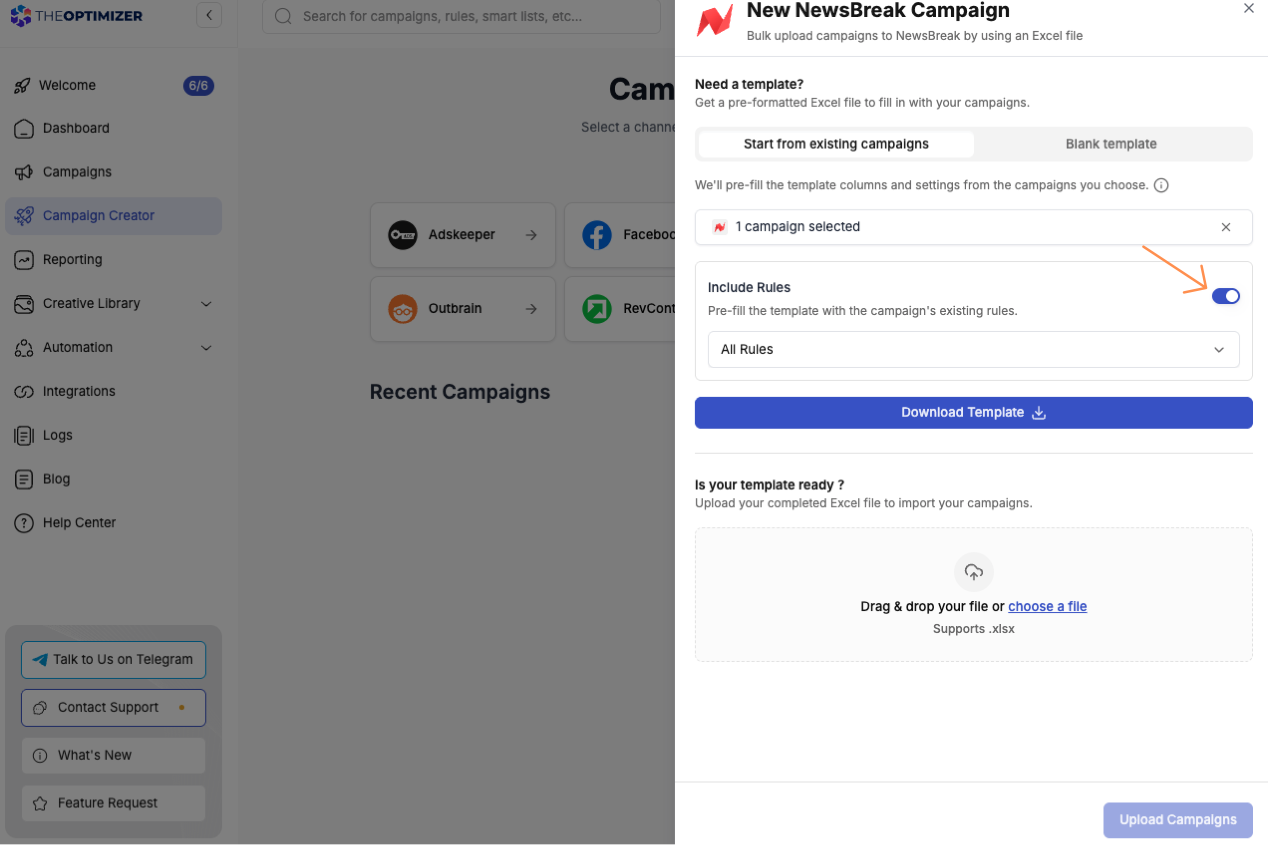
Inside TheOptimizer, open the Campaign Creator menu on the left. Depending on which ad networks you've integrated, you'll see a few options, including NewsBreak. Click the NewsBreak card and a dialog opens with a few ways to generate your Excel template.

You have two starting points:
Start from an existing campaign. This is the option I recommend for real launches. Pick a reference campaign and the download link appears below. The template inherits all of that campaign's real settings, account, budget, bid, targeting, and tracking, so you only change what's actually different, like geo or creatives.
There's also an Include rules option worth checking here. When it's on, all the existing automation rules from the original campaign get baked into the template, so every new campaign you create launches with those rules already applied. You can include all of the original campaign's rules or pick specific ones.
Start from a blank template. Worth doing once, just to see how the template is structured. If you click copy, it makes a copy of the Google Sheet template into your Google Drive, with an example row showing how a single campaign is laid out.
Understanding the Excel template structure
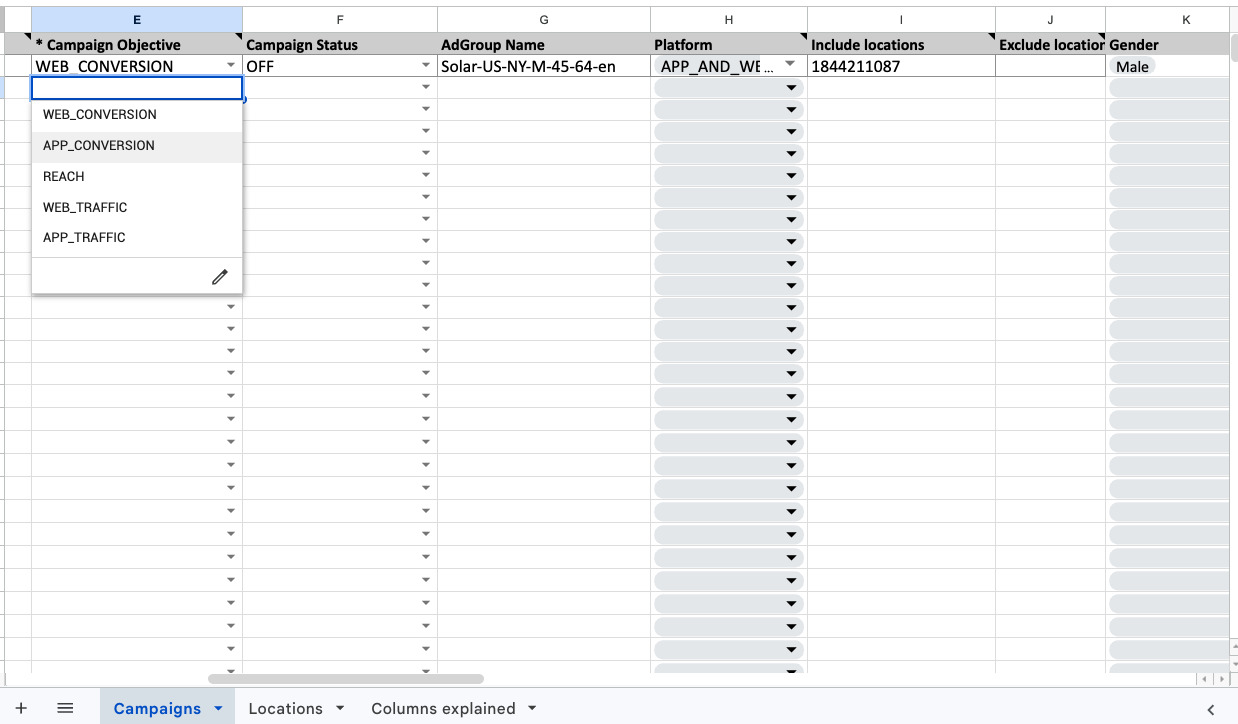
Open the template and you'll find every option needed to create a NewsBreak campaign, laid out across columns. Each column has a description explaining what it does and how to fill it in. Columns that only accept specific values come with those values built in as dropdowns, so you click and select instead of typing and risking a typo.
There are also helper sheets at the bottom. A Locations sheet lists all the available Location IDs you need for geo targeting (NewsBreak targets by numeric Location ID, not by place name). And a Columns explained sheet mirrors the column notes, giving you a plain-language explanation of every field.
You don't need to memorize any of this, that's what the AI skill is for, but it helps to know the shape of the file. Here are the fields that matter most:
The full template runs to around 46 columns, but you rarely touch most of them when you start from an existing campaign. The point of understanding the structure isn't to fill it in by hand, it's to trust what the AI produces.
Let AI build your template for you
Here's where it gets fast. Filling in a 46-column template by hand is exactly the kind of tedious, error-prone work AI is good at removing. So we built a free AI skill, the NewsBreak Campaign Builder, that already understands the entire template: every column, every valid dropdown value, the Location IDs, and the character limits.
It works best in Claude, where it installs as a proper skill, and we also provide a portable version you can drop into ChatGPT or Gemini as a custom GPT or Gem. And you don't need to be a TheOptimizer customer to use it.
The idea is simple: you give the AI three things, an existing campaign template, your images, and your headlines and descriptions, and it produces a complete, upload-ready file. Along the way it will:
- Fill every required column on every row
- Use valid dropdown values for Objective, Bid Type, Platform, and the rest
- Convert geo targeting to the correct numeric Location IDs
- Keep your copy within NewsBreak's limits (Title ≤ 90, Description ≤ 90, Brand Name ≤ 25)
- Detect the naming convention you already use and carry it into the new campaigns
- Validate the whole file before handing it back

You'll find the download and install instructions in TheOptimizer documentation, under the NewsBreak section, in a part called Bulk upload AI skill. If you're on ChatGPT or Gemini, download the portable NewsBreak campaign builder file, and the assistant will walk you through turning it into a custom GPT or Gem.
A real example: scaling a solar campaign step by step
Let me show you what this looks like in practice. Say I have a simple, working NewsBreak campaign: a solar lead-gen offer targeting men aged 45 to 65 in New York City, with a single ad. I want to expand it to three more states, Texas, Florida, and California, and for each state I want one campaign in English and one in Spanish. I also want to change the structure: instead of one ad, each campaign should have two ad sets with three ads each.
Here's the whole process:
- In TheOptimizer, I go to Campaign Creator → NewsBreak, search for my solar campaign, and download its template.
- I open Claude, attach the downloaded template, and paste a short prompt describing what I want: six campaigns for Texas, Florida, and California, one English and one Spanish each, two ad sets with three ads each. I provide three title-and-description pairs and two image links, and ask it to cross-combine them into six ads per campaign and translate the Spanish versions.
- Claude confirms the math, generates the file, and validates it.
A few minutes later, I get the output: 36 ad rows across six campaigns, validated and ready to upload. It kept the same web conversion, $50/day structure from the original, carried over my exact naming convention (New York became Texas, California, and California ES for the Spanish version, and so on), and pulled the correct numeric Location IDs for each state. It even caught a small mismatch, I'd referenced an image URL column that's actually called Asset URL, and corrected it automatically.

One practical note on images: the skill can work with image links or attached files. If you attach image files, it needs a connection to your Google Drive so it can upload them first and use the resulting links. The simplest path is to host your creatives somewhere public and paste the URLs.
Uploading the file to TheOptimizer
Once you have the generated file, launching is trivial. Go back to Campaign Creator → NewsBreak, choose your file, open it, and click Upload campaigns. That's it. Every campaign, ad set, and ad in the file is created at once, with your rules already attached if you included them.
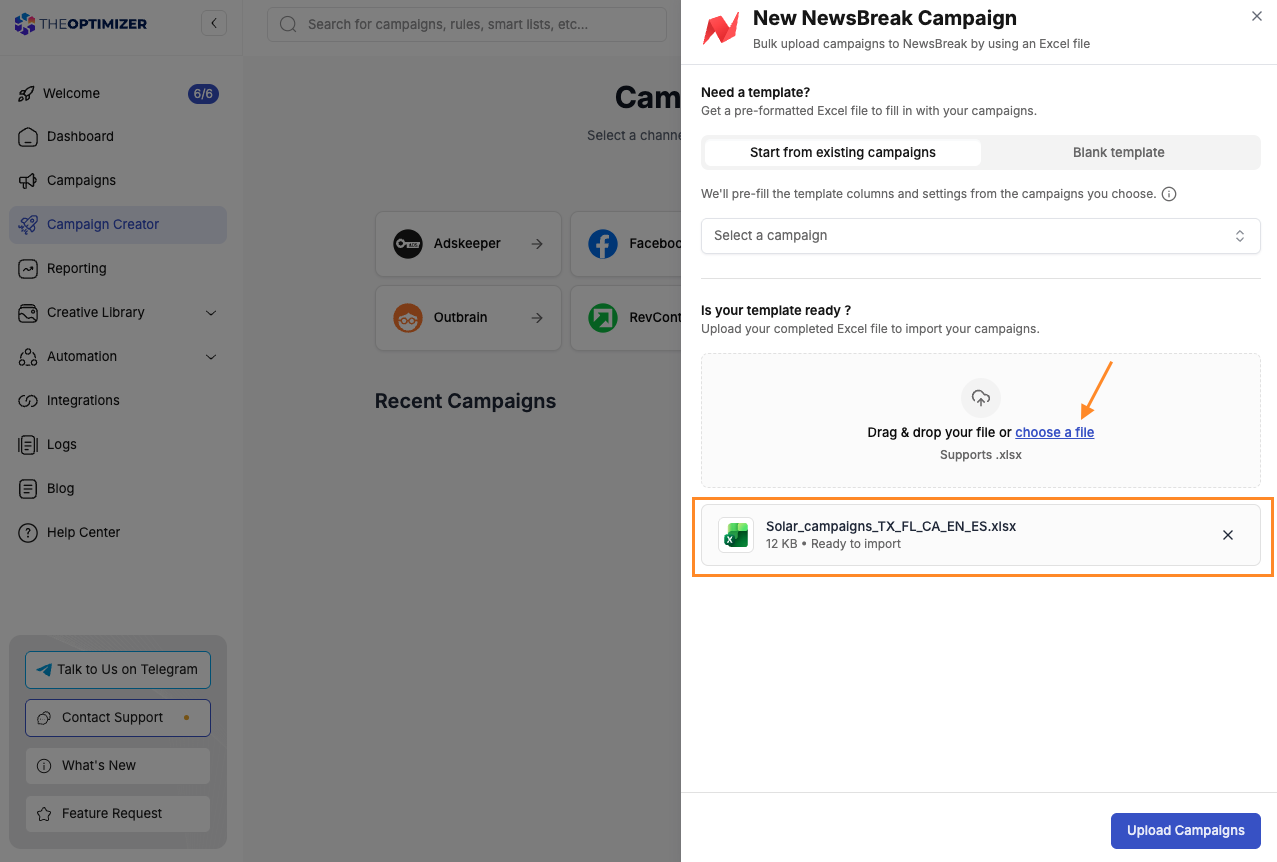
What used to be an afternoon of dashboard clicking is now a single upload. If you've seen our walkthrough of launching 89 campaigns and 630 ads in under an hour on Meta, this is the same idea, now available for NewsBreak.
Bonus: full end-to-end automation with the API
Some teams want to remove even the upload step. They don't just want to generate a template automatically, they want to skip logging into TheOptimizer and uploading by hand entirely. For that, we expose an API.
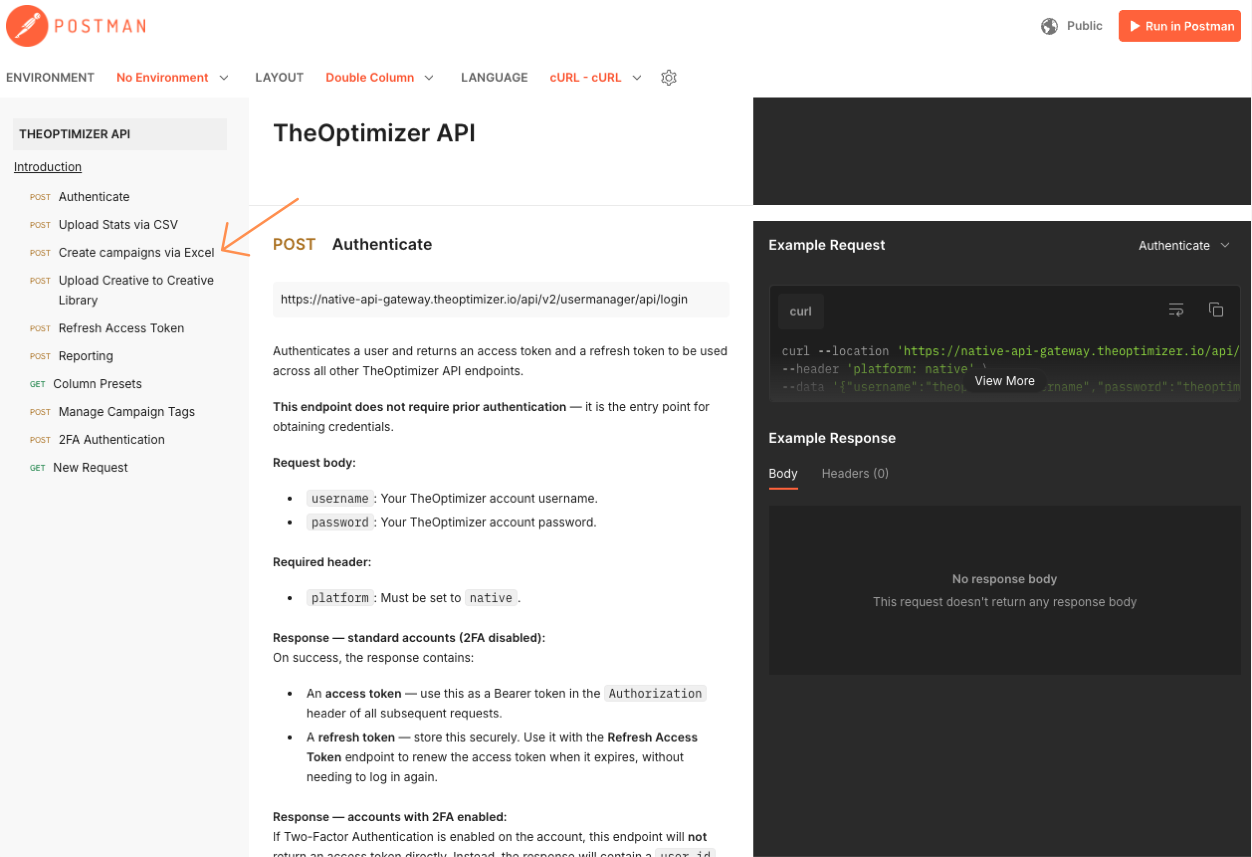
In the documentation you'll find a public API with a Create campaigns using an Excel file endpoint, along with a Postman collection you can load and all the instructions you need to call it. If you have a little technical knowledge, a technical teammate, or you're happy to vibe-code a small script, you can automate the whole loop:
- Feed new creatives and prompts to your AI service
- Have it generate the upload file and drop it in a set location
- Run a script that reads the file and uploads it to TheOptimizer via the API
At that point, launching a fresh batch of NewsBreak campaigns is a background process rather than a task on your to-do list.
Who this is for
If you launch a few NewsBreak campaigns a day, building your setup once and reusing it will save you real hours every week. If you're a team scaling hundreds of campaigns across geos, languages, and creative variations, the template-plus-AI workflow turns what was a full-time data-entry job into a few minutes of review. And if you want to remove yourself from the loop entirely, the API makes that possible too.
The manual work was never the strategy. It was just friction. This removes it.
FAQ
What is the NewsBreak bulk campaign uploader?
It's a feature in TheOptimizer's Campaign Creator that lets you launch many NewsBreak campaigns at once from a single Excel or CSV file. You download a structured template, fill in the rows for each campaign, ad set, and ad, and upload it, and TheOptimizer creates everything for you instead of building each campaign by hand in the NewsBreak ad manager.
How do I bulk upload NewsBreak campaigns?
Open Campaign Creator in TheOptimizer, select NewsBreak, and generate a template, ideally starting from an existing campaign so it inherits your real settings. Fill in the template (or let the AI skill do it), then return to Campaign Creator → NewsBreak, choose your file, and click Upload campaigns. Every campaign in the file launches at once.
Do I need to fill in the Excel template manually?
No. We provide a free AI skill, the NewsBreak Campaign Builder, that understands the full template and builds the file for you from your images and copy. It fills every required column, uses valid dropdown values, converts geo targeting to numeric Location IDs, keeps copy within limits, and validates the file before you upload.
Does the AI skill work in ChatGPT and Gemini, or only Claude?
It works best in Claude, where it installs as a proper skill, but we also provide a portable version you can add to ChatGPT (as a custom GPT) or Gemini (as a Gem). On ChatGPT and Gemini, provide public image URLs, since those assistants can't upload image files or verify links for you.
Do I have to be a TheOptimizer customer to use the AI skill?
No. The AI campaign builder skill is free and anyone can use it to generate a valid NewsBreak upload file. You do need a TheOptimizer account to actually upload the file and launch the campaigns through the bulk uploader.
Can I automate NewsBreak campaign launches completely?
Yes. TheOptimizer exposes a public API with a create-campaigns-using-an-Excel-file endpoint and a Postman collection. With a small script, you can have your AI service generate the upload file and then upload it automatically, removing the manual upload step entirely.
Can I include automation rules when I bulk upload?
Yes. When you generate the template from an existing campaign, turn on the Include rules option. You can carry over all of the original campaign's automation rules, or select specific ones, so every new campaign launches with those rules already applied.